Baystate Health Employee Email Login

So, you're a Baystate Health employee, huh? Welcome to the club! You know what that means? It's time to dive into the magical world of email, my friend. But don't worry, I'm n...
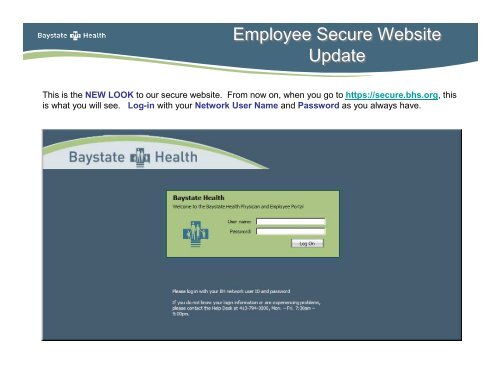
So, you're a Baystate Health employee, huh? Welcome to the club! You know what that means? It's time to dive into the magical world of email, my friend. But don't worry, I'm not gonna leave you hanging. Let's grab a virtual coffee and I'll walk you through this whole Baystate Health Employee Email Login thing, step by step.
First Things First
Alright, let's start with the basics. You've got your trusty computer or mobile device, right? Good. Now, let's get you to the login page. Here's the secret address: https://mail.baystatehealth.org/. Bookmark it, you'll be visiting it a lot.
Logging In: The Big Reveal
Now, here's where the magic happens. You'll see a login page that looks like it's straight out of the '90s. Don't be intimidated, it's just... vintage. At the top, you'll find two boxes. One's for your username, the other for your password. Easy peasy, right?
Must Read
Your username is your Baystate Health network login. If you're drawing a blank, try using your first initial, a dot, and your last name. Like this: j.doe. If that doesn't work, give your IT guy a shout. They're like the email whisperers.
Now, passwords. If you've forgotten it, don't stress. Just click on 'Forgot Password?' and follow the prompts. It's like finding a needle in a haystack, but with fewer haystacks.
 Login/SignUp Mybaystatehealth Patient Portal - www.baystatehealth.org
Logging In from Home: The Remote Dilemma
Working from home, huh? You rebel. Here's how you do it: First, log in to the Baystate Health Virtual Private Network (VPN). It's like a secret tunnel to the office. Once you're in, head back to that login page we talked about earlier. Easy as pie.
Two-Factor Authentication: The New Kid on the Block
Heads up, folks! Baystate Health is all about security these days. That means you might have to do a little extra dance called 'Two-Factor Authentication'. Don't worry, it's not as complicated as it sounds. After you enter your password, you'll get a code sent to your phone. Pop that in, and voila! You're in.
 MyBaystate Patient Portal
Troubleshooting: When the Going Gets Tough
Alright, so you've tried everything, but you're still locked out. Don't throw your laptop out the window just yet. Here are a few things to check:
- Make sure you're using the correct username and password. Yes, I know, it's obvious. But sometimes, the obvious is the hardest to see.
- Check your caps lock. It's a sneaky little button that loves to ruin your day.
- If all else fails, give the IT department a call. They're like the email police. They'll sort it out.
And We're In!
Congratulations, you've made it! You're now looking at your inbox, ready to tackle the day. Remember, if you ever get stuck, there are plenty of resources out there. And if all else fails, just imagine your email is a giant, digital post-it note. You got this!
