How Do I Reset My Iphone To Factory

So, you've found yourself in a pickle with your iPhone, huh? No worries, we've all been there. It's like when your room's a mess, and the only way to fix it is to start from s...

So, you've found yourself in a pickle with your iPhone, huh? No worries, we've all been there. It's like when your room's a mess, and the only way to fix it is to start from scratch. That's right, we're talking about resetting your iPhone to factory settings. Buckle up, folks, 'cause we're about to dive into a world of techy fun!
Why Reset, You Ask?
Alright, let's get the serious stuff out of the way first. Resetting your iPhone to factory settings can solve a whole bunch of issues. Think of it as giving your phone a fresh start. It can help when your phone's acting up, apps are misbehaving, or you're selling/giving away your phone and want to wipe all your data.
But here's the kicker - it's like giving your phone a lobotomy. Everything will be erased. Photos, contacts, apps, settings, the works. So, before you proceed, make sure to back up your data. You can use iCloud, iTunes, or even third-party apps. Think of it as packing your bags before a big move.
Must Read
Let's Get Started!
Method 1: Settings
This method is as easy as pie. Just follow these steps:
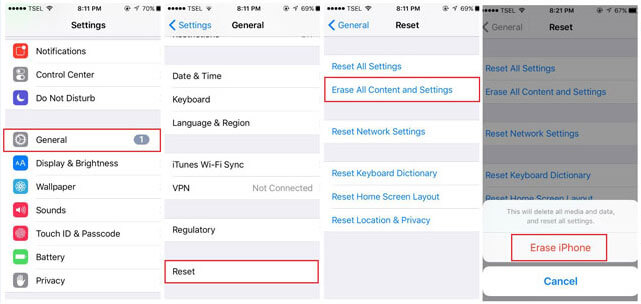
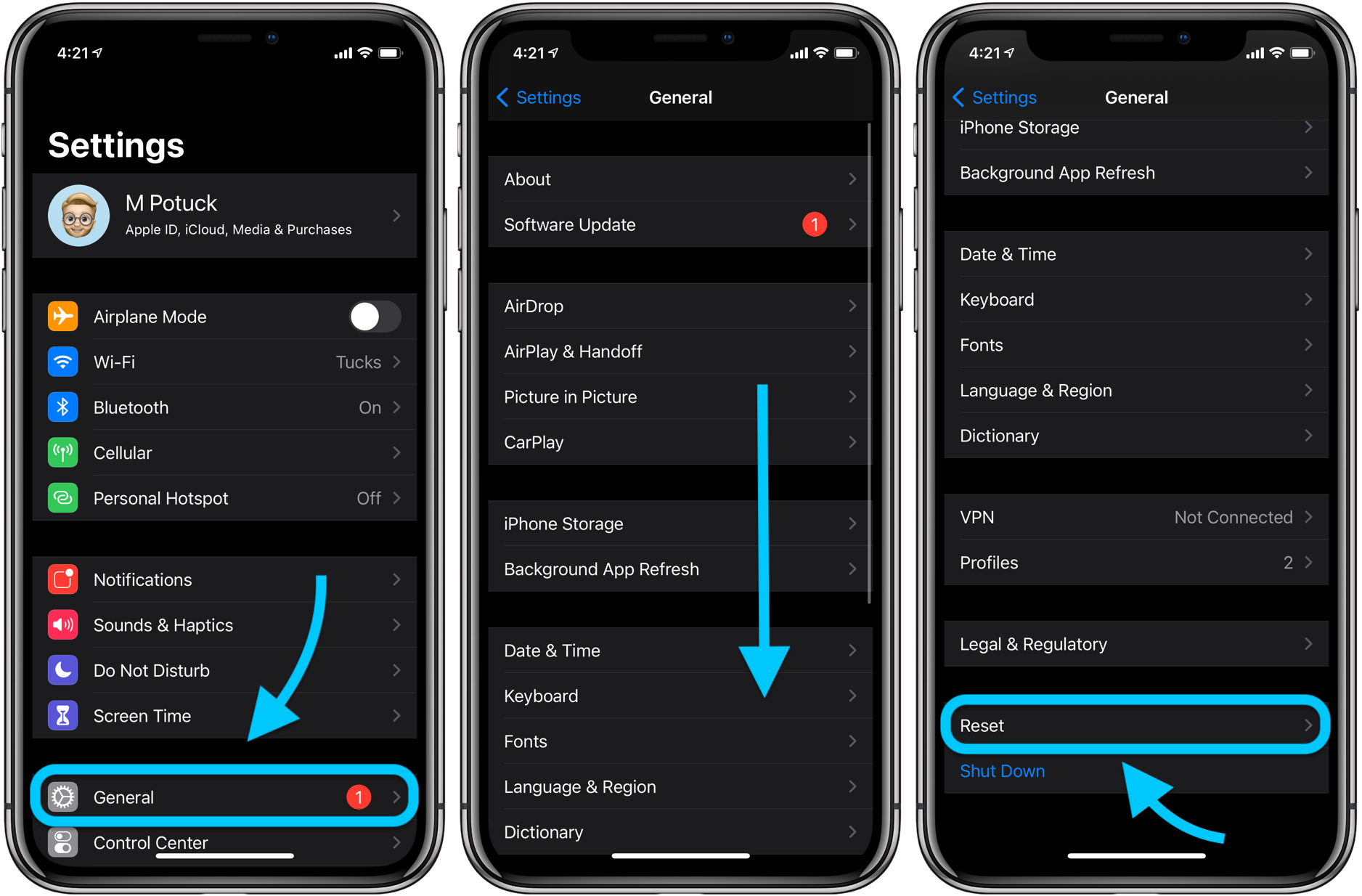
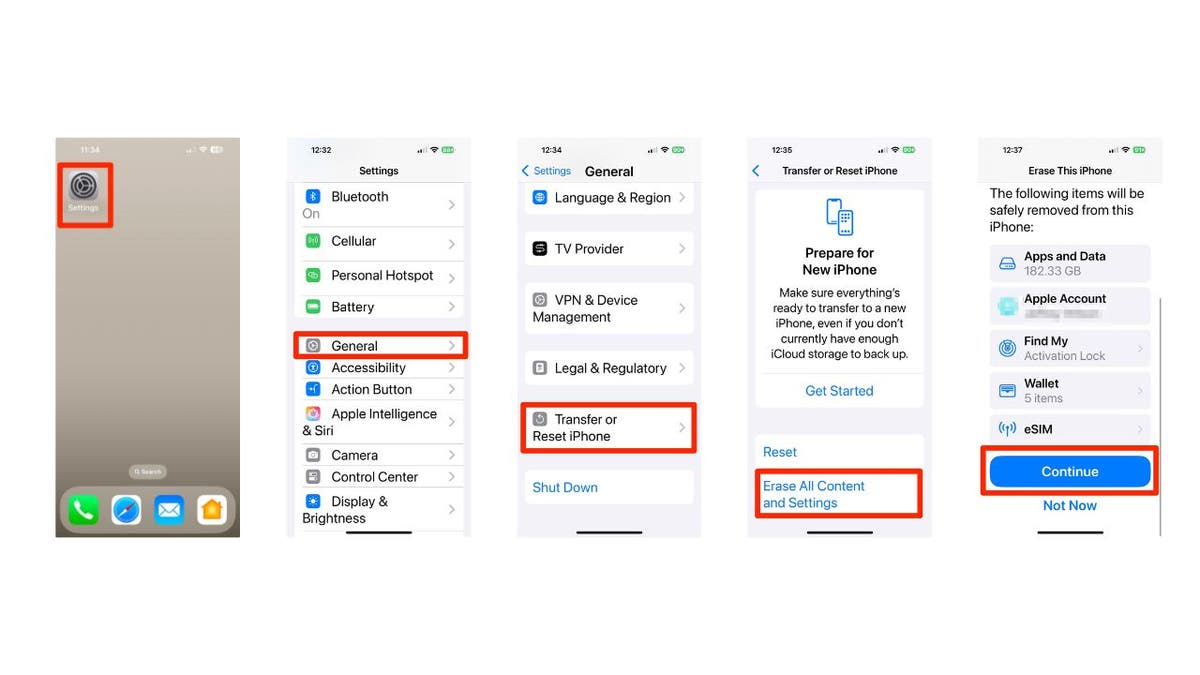
- Open the Settings app on your iPhone.
- Scroll down and tap General.
- Scroll down again and tap Reset.
- Tap Erase All Content and Settings.
- Enter your passcode if prompted.
- Confirm that you want to erase your phone. It's like pulling the trigger, but less dramatic.
Your iPhone will then reboot and start the reset process. It's like watching a tiny, techy rebirth. Isn't that just the cutest thing?
 3 Step-by-Step Simple Guide to Factory Reset iPhone without Passcode
Method 2: iTunes
Now, if your iPhone is being extra stubborn and won't turn on, or you can't access the Settings app, you can use iTunes to reset it. Here's how:
- Connect your iPhone to your computer.
- Open iTunes (if it doesn't open automatically).
- Select your iPhone when it appears in iTunes.
- Click on the Summary tab at the top of the screen.
- Click on Restore iPhone.
- Confirm that you want to restore your iPhone. It's like saying goodbye to an old friend, but you know they'll be back, better than ever.
iTunes will then download software for your iPhone and then erase and restore it. It's like giving your phone a spa day, but with less cucumber water and more tech magic.
 Iphone 8 Factory Reset Mode | Restore your iPhone, iPad, or iPod to
Quirky Fact: The iPhone's First Boot
Did you know that when you first turn on a new iPhone, it goes through a series of checks and balances before it's ready to use? It's like a tiny, techy version of the Olympics. And get this, if your iPhone fails any of these checks, it won't boot up. It's like having a really strict bouncer at the door, checking IDs and making sure everyone's in tip-top shape.
Fun Fact: The iPhone's 'Hello' Message
When you first turn on a new iPhone, it displays a simple message: "Hello". But did you know that this message is actually a hidden feature? If you hold down the power button for a few seconds after turning on your iPhone, you'll see a hidden 'Connect to iTunes' screen. It's like finding a secret room in your house, but with less dust and more techy goodness.
 How to factory reset your iPhone | Fox News
Why This Topic is Just Fun
Resetting your iPhone to factory settings might seem like a daunting task, but it's actually a lot of fun. It's like playing god with your phone. You get to decide what stays and what goes. It's a chance to start fresh, to make your phone new again. And who doesn't love a good fresh start?
Plus, there's something satisfying about watching your iPhone reboot and come back to life. It's like watching a tiny, techy phoenix rise from the ashes. It's a reminder that even when things seem broken, they can always be fixed. Or at least, given a fresh start.
So, there you have it. Resetting your iPhone to factory settings doesn't have to be a scary task. It can be a fun, engaging, and even a little bit quirky experience. So, go on, give it a try. Your iPhone will thank you (in its own tiny, techy way, of course).
