How Do You Download Your Facebook Data

Ever wondered what Facebook knows about you? Like, really knows? I mean, we've all shared a thing or two (or a thousand) on the platform, but have you ever stopped to think, "...
Ever wondered what Facebook knows about you? Like, really knows? I mean, we've all shared a thing or two (or a thousand) on the platform, but have you ever stopped to think, "Hey, what's all this data Facebook's got on me?" Well, buckle up, friend! We're about to dive into the wild world of downloading your Facebook data. It's like going on a treasure hunt, but instead of pirates, you've got Mark Zuckerberg. Swashbuckling, right?
Why Download Your Data, You Ask?
First things first, why would you want to download your Facebook data? Well, curiosity, for one! It's like finding out you've got a secret twin you never knew about. Plus, it's a great way to see just how much of your life you've been sharing online. Spoiler alert: it's probably a lot.
But it's not just about satisfying your curiosity. Downloading your data can also help you understand what Facebook knows about you, which can be useful for privacy reasons. It's like giving Facebook a pop quiz. You might be surprised (or horrified) by how well it scores.
Must Read
Let's Get Down to Business
Alright, so you're ready to dive in. First things first, you'll need to log into your Facebook account. If you can't remember your password, now's the time to panic. Kidding! (Sort of.)
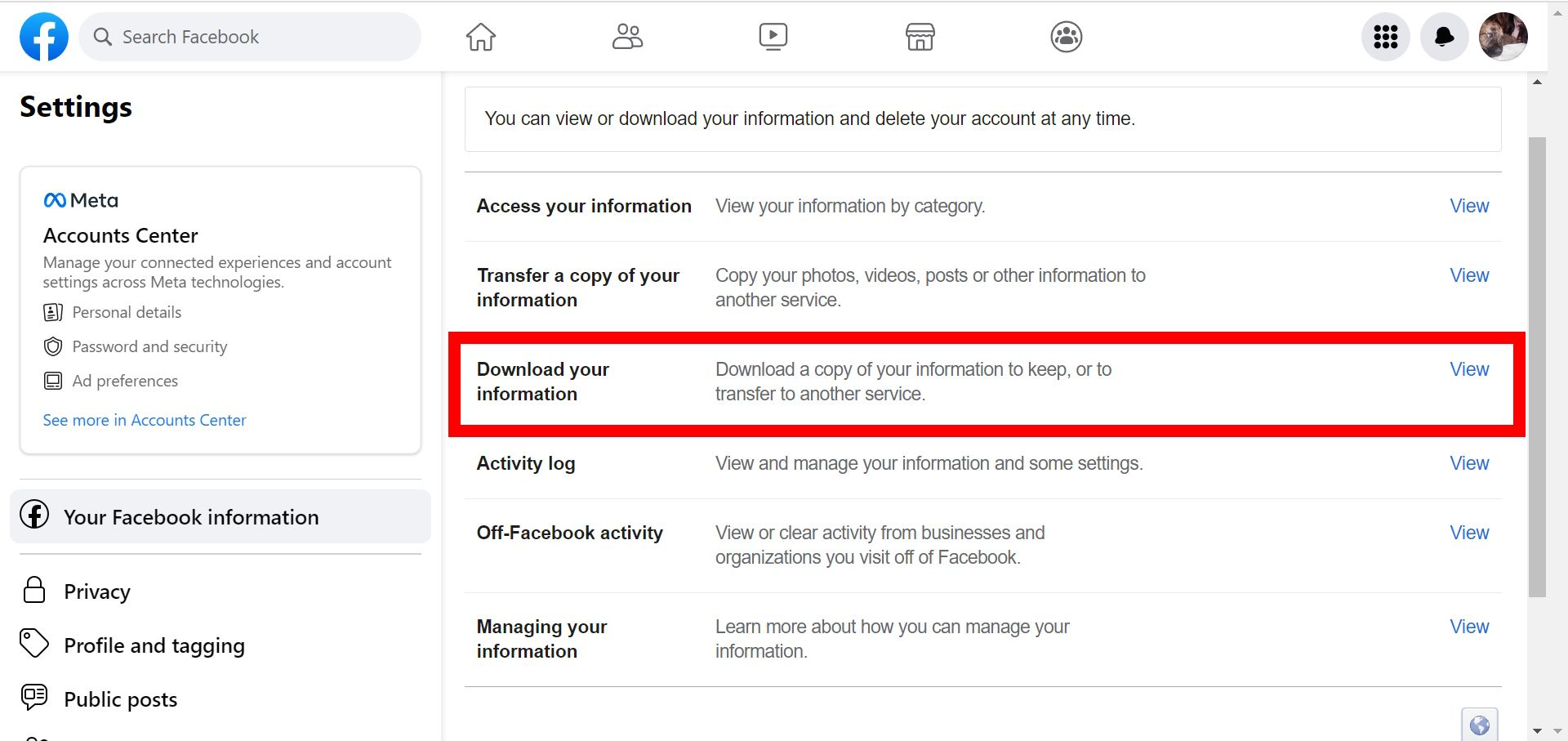
Once you're in, click on the little downward arrow in the top right corner of your screen. This is your gateway to the Facebook settings labyrinth. Click on "Settings & Privacy," then "Settings." See, we're already making progress!
Finding the Data Download Option
Now, scroll down to the "Your Facebook Information" section. It's like finding the holy grail of Facebook settings. Click on "Download Your Information." And boom! You're one step closer to downloading your data.
But wait, what's this? Facebook wants you to verify your identity. It's like they don't trust you enough to see your own data. Rude. But fair, I guess. So, go ahead and verify your identity. It's a quick and painless process. Promise.
 How to Download your Facebook Data - YouTube
Customizing Your Data Download
Alright, now that Facebook's satisfied you are who you say you are, it's time to customize your data download. You can choose the date range (because who wants to download 15 years' worth of data all at once?), the format (JSON for the tech-savvy, HTML for the rest of us), and the media quality (because let's be real, you don't need high-res photos of your ex).
You can also choose what kind of data you want to download. We're talking messages, photos, posts, events, and more. It's like picking your favorite flavors at an ice cream shop, but with less brain freeze (hopefully).
And Then You Wait...
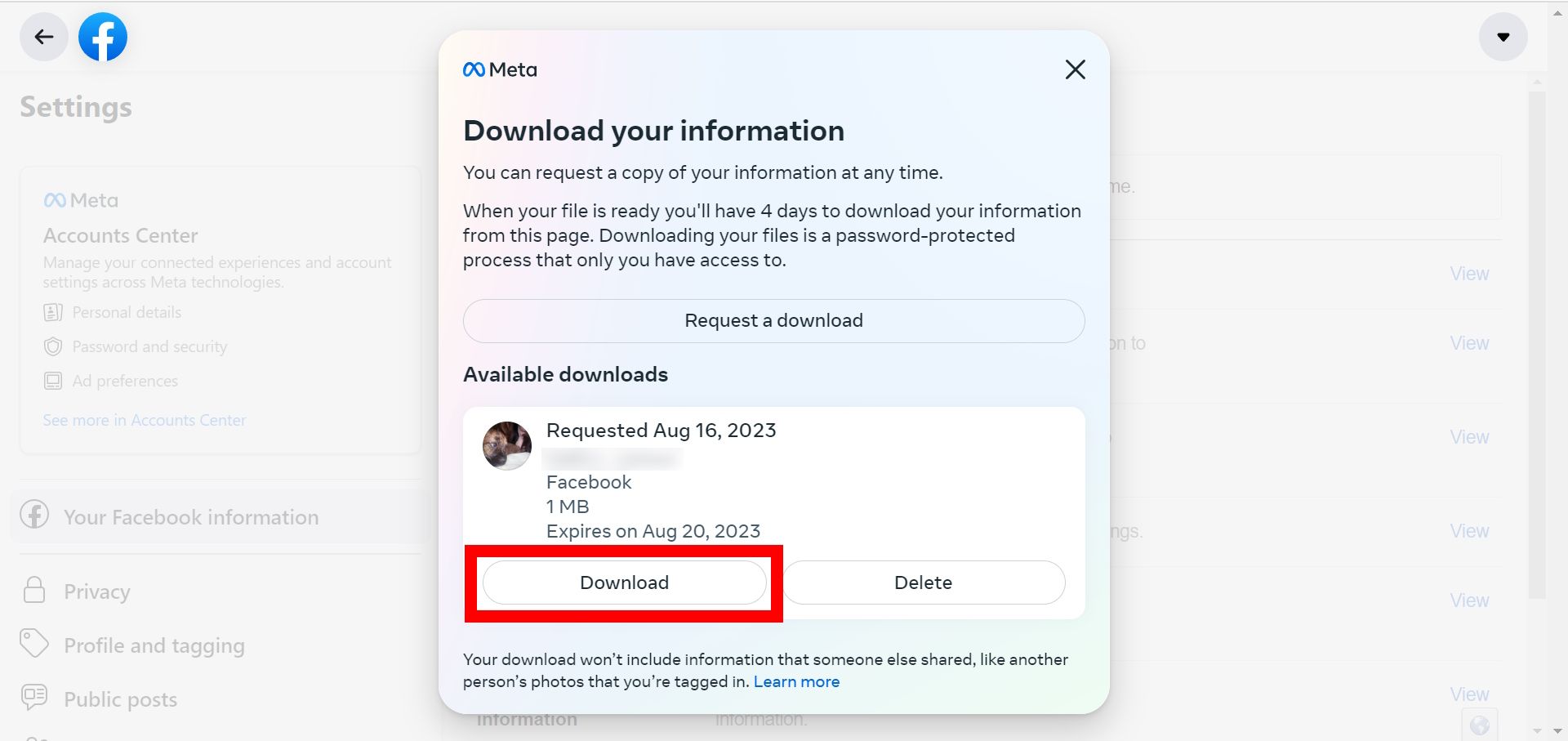
So, you've made your choices, clicked "Create File," and now you're left waiting. Facebook's busy packing up your data, and it can take a while. Like, up to 48 hours. So, you might want to binge-watch something while you wait. I won't judge.
Once your data's ready, Facebook will send you a link to download it. And then, my friend, you're in for a treat. Or a shock. Depends on how much you've shared on Facebook.
 How to download your Facebook data
What's in Your Data?
So, what's in this data download of yours? Well, it's a lot. Like, a lot a lot. We're talking every message you've ever sent, every photo you've ever posted, every event you've ever RSVP'd to. It's like a digital time capsule of your life.
But here's the thing: it's not just your data. It's also data about you. Like, who you've messaged, who's messaged you, who you've tagged in photos. It's a treasure trove of information about your social life. Scary? A little. Fascinating? Definitely.
But Wait, There's More!
You might be thinking, "This is all well and good, but what do I do with this data now?" Well, that's up to you. You could analyze it, like some people do with their fitness tracker data. You could turn it into a book, like that one guy who turned his Facebook data into a novel.
Or you could just look through it, reminisce about old times, cringe at old photos. It's your data, after all. You do what you want with it. Just remember, once you've downloaded it, it's out of Facebook's hands. So, keep it safe, okay?
So, Are You Ready to Dive In?
Downloading your Facebook data is a journey. It's a journey into your past, into your online presence, into the heart of Facebook itself. It's not always pretty, but it's always interesting. So, what are you waiting for? Go on, download your data. You might just learn something about yourself. Or at least get a good laugh at your old profile picture.
