How To Cancel Your Canva Subscription

Alright, gather 'round, folks. Let's talk about that sneaky little subscription you've got with Canva. You know, the one that's been quietly charging you month after month, li...
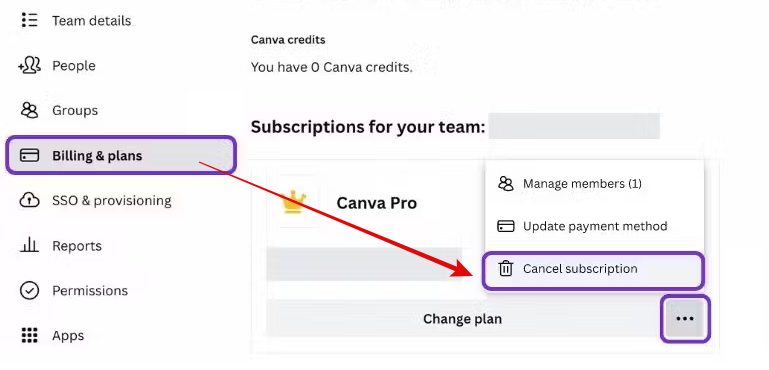
Alright, gather 'round, folks. Let's talk about that sneaky little subscription you've got with Canva. You know, the one that's been quietly charging you month after month, like a tiny, pixelated vampire. Don't worry, we're not here to judge. We've all been there - "Oh, I'll just use it for this one project," you said. "It won't hurt to have it for a month or two," you reasoned. Next thing you know, you're up to your eyeballs in Canva templates, and your bank account is crying out for help.
First things first: Why cancel, you ask?
Well, maybe you've found a cheaper alternative. Maybe you've realized you're more of a PowerPoint person. Or maybe - and I say this with all the love in the world - you've just had enough of seeing "Canva" pop up on your monthly statements, like an unwelcome party crasher. Whatever your reason, we're here to help you kick Canva to the curb. (Metaphorically, of course. I hear their customer support is actually quite lovely.)
Before we dive in, a fun fact to lighten the mood:
Did you know that Canva was founded in 2012 by a guy named Melanie Perkins? No, not that Melanie - the other one. (Kidding, there's only one Melanie Perkins, and she's a total rockstar.) Anyway, she started Canva because she wanted to make graphic design more accessible. And look at it now - it's everywhere! It's like the cockroach of the design world. You can't get rid of it, but you can sure try.
Must Read
Now, let's get down to business:
Step 1: Log in to your account
First things first, you need to log in to your Canva account. Go ahead, type in that username and password you haven't used since 2015. (Don't worry, I won't tell anyone you still use "Password123" as your password.)
Step 2: Head to your account settings
Once you're in, click on your profile picture (or initial, if you're fancy) in the top right corner. Then, click on "Account settings." It's like going into the control panel of your Canva life. Scary, isn't it?
 How to Cancel Your Canva Subscription: Simple Instructions Coloring
Step 3: Find the subscription section
Now, scroll down until you see the "Subscription" section. It's usually hiding out with all the other boring stuff, like "Payment methods" and "Notifications." Don't be fooled by its mundane appearance - this is where the magic happens.
Step 4: Click on "Cancel subscription"
Alright, here's where things get real. See that little button that says "Cancel subscription"? Yeah, that one. Click it. Go on, you can do it. It's like ripping off a Band-Aid. (A very colorful, graphically designed Band-Aid.)
Step 5: Choose your reason
After you've clicked that button, Canva will ask you why you're cancelling. Now's your chance to tell them exactly what you think of their "Premium" plan. (Just kidding, be nice. Remember, their customer support is lovely.) Pick a reason, any reason. "I found a cheaper alternative" works just fine. Or, if you're feeling dramatic, "I've found someone new. Someone... PowerPoint-ier."
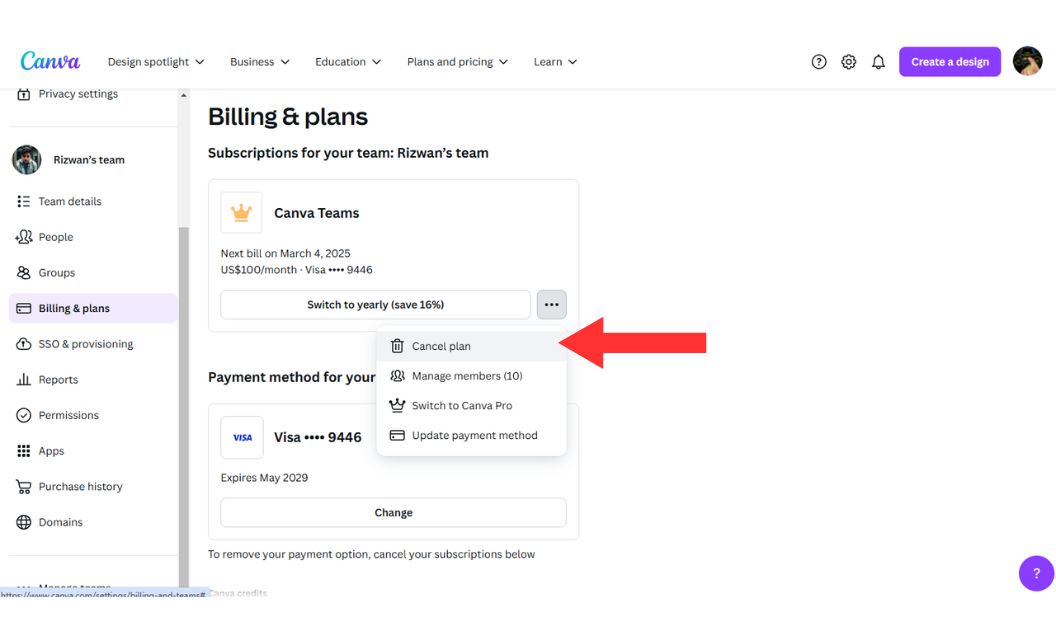 How to Cancel Canva Subscription – Step-by-Step Guide – Simple Author Box
Step 6: Confirm your cancellation
Finally, you'll be asked to confirm your cancellation. This is it, folks. The moment of truth. Click that "Yes, cancel my subscription" button, and just like that, you're free. Free from the clutches of Canva's monthly charges. Free to explore the wild, untamed world of... well, other design software.
And there you have it!
You've successfully cancelled your Canva subscription. You should feel proud. You've taken control of your design life. You've broken free from the shackles of monthly charges. You've... wait a minute. Why is Canva still charging me? I swear, it's like they have a sixth sense for when you cancel. (Don't worry, that's just your free trial kicking in. You've got a whole month to enjoy Canva's premium features before they finally let you go.)
But seriously, folks, cancelling a subscription can be a daunting task. It's like breaking up with a partner - you know it's the right thing to do, but it's still scary. So, kudos to you for taking the plunge. Now, go forth and design something amazing. Just... maybe not on Canva.
