How To Convert A Pages File To Word

So, you've got a Pages file, and you're thinking, "I wish I could use this on my trusty old Word processor, but how?" Well, friend, you're in the right place. We're gonna turn...

So, you've got a Pages file, and you're thinking, "I wish I could use this on my trusty old Word processor, but how?" Well, friend, you're in the right place. We're gonna turn this into a piece of cake, I promise. No more stressing out like a cat trying to figure out a can opener!
Why Bother, You Ask?
Alright, let's set the scene. You're working on a project, and your team's using Word. You, however, are a Pages fan. You've finished your part, but now you need to send it over. You could convert it, but who's got the time, right? WRONG! It's actually super quick and easy. Plus, think of it like teaching your dog a new trick - once you know how, it's a breeze!
Let's Get Started!
First things first, open your Pages document. Now, don't go clicking 'File' and 'Export' just yet. We're gonna do this the easy way. See that little 'Share' button up there? Click it. It's like inviting a friend over for coffee - simple and friendly!
Must Read
Now, you'll see a few options. We want the one that says 'Microsoft Word'. Click that, and voila! Your document is now a Word file, ready to go. It's like giving your friend a cup of coffee - easy peasy!
But Wait, There's More!
What if you're not on a Mac? No worries! There's a sneaky trick for PC users too. Open your Pages file in iCloud Drive. Then, right-click on it and select 'Download a Copy'. Choose 'Word' from the dropdown menu, and boom! You've just converted your file.
 How to Convert Pages to Word? A Detailed Guide
Now, you might be thinking, "But what if I want to keep my fancy Pages formatting?" Well, here's a secret - Word usually keeps it all intact. But if it doesn't, just use the 'Match Source Formatting' option in Word. It's like telling your friend to bring their favorite mug - everything stays just the way you like it!
Troubleshooting: When It All Goes Pear-Shaped
Alright, so sometimes things don't go as planned. Maybe your document's looking a bit wonky in Word. Don't panic! Just use the 'Select All' command (Ctrl + A) and then 'Copy' (Ctrl + C). Then, paste it into a new Word document. It's like giving your friend a new mug when theirs breaks - everything's back to normal!
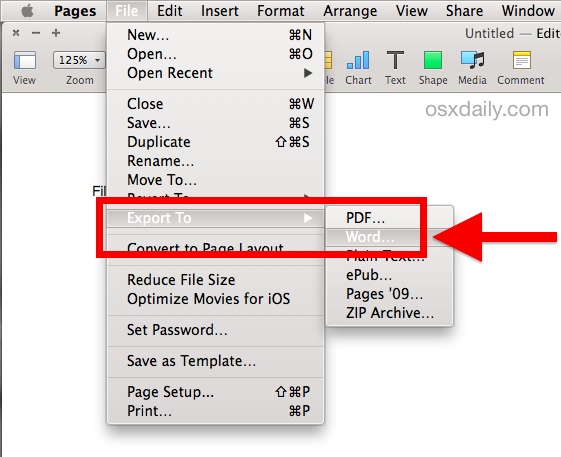 How to Save Pages Files as Word Document Format from Mac - OS X Daily
And there you have it! You're now a pro at converting Pages to Word. You've gone from a tech-newbie to a whiz in just a few minutes. It's like learning to ride a bike - once you know how, you'll never forget!
So, the next time someone asks you how to convert a Pages file to Word, you can smile and say, "No problem, it's as easy as teaching a cat to can open!" And then you can share your newfound wisdom. Happy converting!
