How To Create New Email Address Gmail

So, you've finally decided to bid farewell to your trusty old email address that's been with you since the dawn of the internet age. You know, the one that's got more numbers...

So, you've finally decided to bid farewell to your trusty old email address that's been with you since the dawn of the internet age. You know, the one that's got more numbers and symbols than a secret code, and makes you feel like you're still using a dial-up connection every time you log in. It's time for a change, my friend, and Gmail is here to save the day!
Why Gmail, you ask?
Well, let me tell you, Gmail is like the cool kid on the block. It's got all the features you could ever want, it's easy to use, and it's got that little green robot for a mascot - what's not to love?
Let's get started!
First things first, you're gonna need to head on over to the Gmail sign-up page. Don't worry, I'll wait while you grab a snack and get comfy. Ready? Let's dive in!
Must Read
Now, you'll see a big blue button that says "Create your Google Account". Click that bad boy, and let the magic happen.
Fill in the blanks
You'll be greeted with a form that looks a little something like this:
First Name: Your first name goes here
Last Name: And your last name here
Username: This is where you'll create your new email address
Now, here's where things get fun. You get to choose your new email address! Isn't that exciting? You can use your name, a nickname, or even something completely random. Just make sure it's something you'll remember (and that you're not embarrassed to share with your grandma).
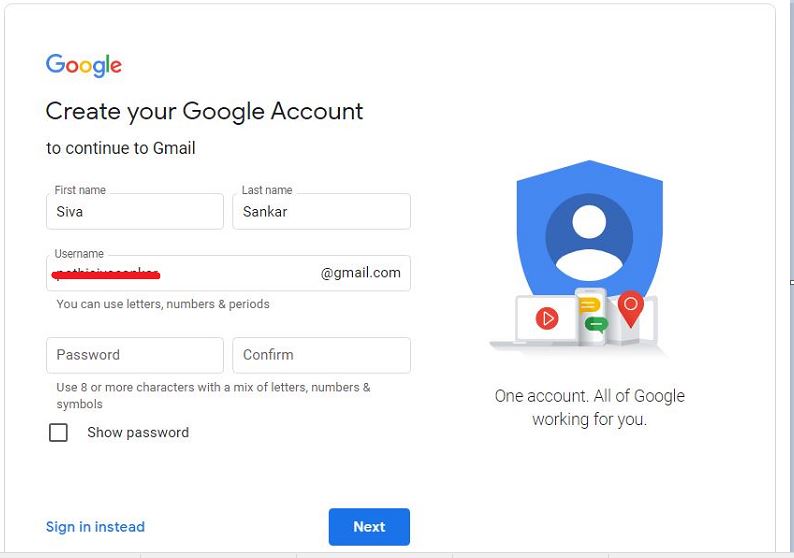 Effortlessly Create a New Gmail Account: A Step-by-Step Guide
Once you've picked your username, it's time to choose a password. Please, please, please make it a good one. We've all seen those data breach headlines, and we don't want to be the next victim, do we?
Here's a little tip: use a mix of uppercase and lowercase letters, numbers, and symbols. And if you're really feeling fancy, you can even throw in a space or two. Just make sure it's something you can remember (or write down and hide in a secure place).
Confirm your identity
Alright, now it's time to prove you're a real human being. Gmail will ask for your phone number, and they'll send you a verification code via text message. Don't worry, it's a quick and painless process.
Once you've entered the code, Gmail will give you a little pat on the back and welcome you to the family. Congratulations, you're now the proud owner of a shiny new Gmail account!
 How to Create a Gmail Account
But wait, there's more!
Now that you're all set up, it's time to start exploring all the awesome features Gmail has to offer. You can customize your theme, set up filters to organize your inbox, and even use Google's suite of productivity tools (like Google Docs and Sheets) right from your inbox.
And the best part? You can access all of this from any device, anywhere in the world. So whether you're at home, at work, or on vacation, your email is always just a click away.
So there you have it, folks. Creating a new email address with Gmail is easy, fun, and totally worth it. No more struggling with long, complicated email addresses or dealing with an inbox that looks like a war zone. With Gmail, you can take control of your digital life and finally say goodbye to your old, outdated email address.
Now go forth, and start enjoying the perks of being a Gmail user. You've earned it!
