Print On Both Sides Flip On Long Edge

So, there I was, knee-deep in printer ink, cursing the gods of office supplies. I'd just spent half an hour printing a report, only to realize I'd used up the last of the pape...
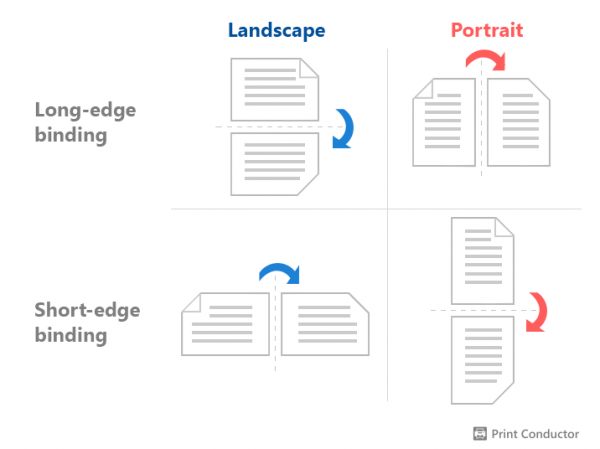
So, there I was, knee-deep in printer ink, cursing the gods of office supplies. I'd just spent half an hour printing a report, only to realize I'd used up the last of the paper. And guess what? It was all printed on one side. You know, like some sort of ancient parchment that's too precious to waste on the back. I mean, who even does that anymore?
That's when it hit me. I'd been using my printer like a caveman, when all this time, it could've been printing like a pro. I'm talking about printing on both sides, folks. You know, like a real, modern human being.
Why Should You Care About Double-Sided Printing?
Alright, let's get real here. The planet's not getting any younger, and neither are our wallets. Every time we print something on one side and then toss it in the recycling bin, we're wasting resources. And money. Lots of money. I mean, who wants to be the office Scrooge McDuck, swimming in a vault full of single-sided printouts?
Must Read
But here's the thing. Printing on both sides isn't just about saving the planet (although that's a pretty good reason). It's about saving your sanity. Because let's face it, nothing's more frustrating than having to flip through a stack of papers to find the next page. It's like trying to read a book that's been written in invisible ink. Not cool.
How to Print on Both Sides: The Easy Way
Alright, so you're convinced. You're ready to join the double-sided revolution. But where do you start? Don't worry, I've got you covered.
First things first, you need to know your printer's lingo. What you're looking for is the duplex printing option. It's like the secret handshake of the printing world. Some printers have it as a button on the machine itself, others hide it in the printer's menu. If you're struggling to find it, don't be afraid to consult the manual. Yes, I know, it's like admitting you need a map to find your way around your own home. But hey, nobody's perfect.
 Print On Both Sides Flip On Short Edge Meaning
Once you've found the duplex printing option, it's time to choose your side. Literally. There are two types of duplex printing: long-edge and short-edge. The difference? It's all about how the paper is fed through the printer. Long-edge means the paper is fed through lengthwise, so the printouts are flipped over the long edge. Short-edge is the same, but with the paper fed through widthwise. Confusing, right? Don't worry, I'll wait while you grab a snack. Or a stiff drink. I won't judge.
Why Long-Edge Duplex Printing Rocks
Alright, so you've got your printer set up for duplex printing. But which way should you go? Long-edge or short-edge? Well, let me tell you, long-edge is where it's at. Why? Because it's fast. See, with long-edge duplex printing, the printer only has to flip the paper once. That means it can print both sides in one go. It's like a printing assembly line. Efficient. Sleek. Downright sexy.
Short-edge, on the other hand, is like the printing world's equivalent of a game of musical chairs. The printer has to feed the paper through, print one side, feed it back through, flip it, and then print the other side. It's a whole lot of fuss for not much gain. I mean, who's got time for that?
 How to Print Double Sided on Sharp Printer: Top 3 Tips
But What About My Poor, Confused Printer?
I get it. You're worried about your printer. You're thinking, "But what if my printer can't handle it? What if it starts printing in hieroglyphics?" Well, fear not, my friend. Most modern printers can handle duplex printing like a boss. But if you're still not sure, there's a simple test you can do.
Grab a piece of paper and fold it in half, then unfold it again. See how the crease is down the middle? That's the long edge. Now, fold it the other way, so the crease is across the middle. That's the short edge. If your printer can handle a folded piece of paper, it can handle duplex printing. Easy peasy, lemon squeezy.
And There You Have It
So, there you have it. The secret to printing like a pro. No more wasted paper. No more frustrated flipping. Just smooth, efficient, double-sided printing. You're welcome.
Now, go forth and print. But remember, with great power comes great responsibility. Don't go printing the entire internet on both sides. That's just silly.
