What Is Difference Between X86 And X64

So, What's the Deal with X86 and X64? Ever felt like you're at a tech party, and everyone's talking in a language you don't quite get? You know, like when your tech-savvy cou...
So, What's the Deal with X86 and X64?
Ever felt like you're at a tech party, and everyone's talking in a language you don't quite get? You know, like when your tech-savvy cousin starts blabbering about X86 and X64, and you're just there, nodding politely, hoping they'll switch to something more... human?
Well, today's your lucky day! We're going to demystify these tech terms, using real-life examples and a whole lot of fun. So, grab a cup of coffee, and let's dive in!
Imagine Them as Twins
Think of X86 and X64 as twins. They're both part of the same family, but they have some key differences. You see, X86 is the older twin, born back in the 80s (yes, that's how old it is!), while X64 is the younger one, born in the 2000s.
Must Read
Now, you might be wondering, "Why should I care about these tech twins?" Well, stick around, because understanding them can help you make better choices when it comes to your computer or laptop.
X86: The Old-Timer
Let's start with X86, the old-timer. This guy has been around for ages, and he's used in a lot of older computers and software. You can think of him as the classic car enthusiast - he's got that vintage charm, but he's not exactly known for his speed or efficiency.
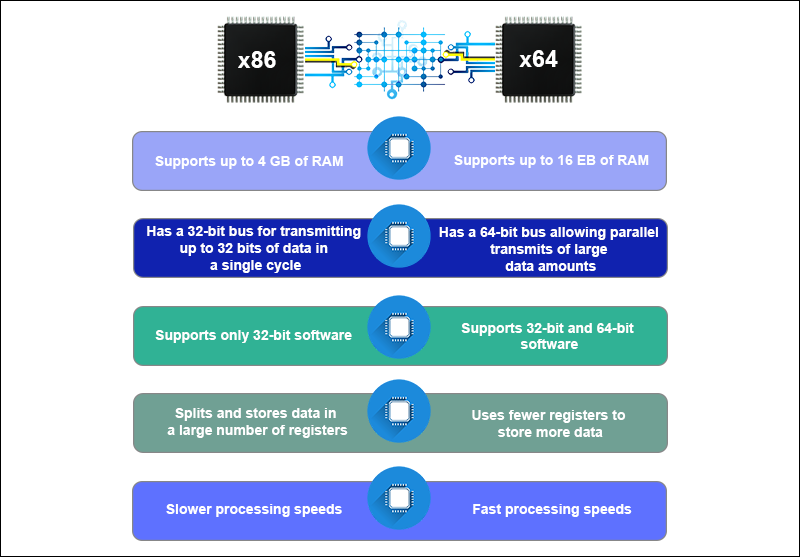
X86 uses something called 32-bit processing. Imagine you're at a buffet (yes, we're going there), and you've got a plate that can only hold 32 bits of food at a time. That's what 32-bit processing is like - it can only handle a certain amount of data at once. It's like having a small plate at an all-you-can-eat buffet - you've got to make multiple trips to fill up!
 x86 vs x64: Key Differences and Which One to Choose
X64: The Modern Kid
Now, let's meet X64, the modern kid. This one's all about efficiency and speed. He uses 64-bit processing, which is like having a massive platter at that buffet - you can load up on way more food in one go!
With X64, you can handle much larger amounts of data at once. It's like having a supercharged engine in your car - you can go faster and carry more stuff. That's why X64 is great for things like gaming, video editing, and other tasks that need a lot of processing power.
So, Why Should You Care?
You might be thinking, "This is all well and good, but why should I care about these tech twins?" Well, here's why:
 x64 vs. x86: Key Differences Explained
- Software Compatibility: Some software is only designed to work with one twin or the other. If you've got an X86 computer, you might not be able to run the latest games or software designed for X64.
- Future-Proofing: If you're buying a new computer, choosing the right twin can help you future-proof your purchase. X64 is the way of the future, so if you go with X86, you might find yourself needing a new computer sooner rather than later.
- Performance: As we talked about earlier, X64 can handle more data at once. That means faster processing speeds and better performance for tasks that need a lot of power.
But What About My Current Computer?
You might be wondering, "So, which twin am I dealing with?" Well, here's a quick way to check:
- On a Windows computer, right-click on 'This PC' and select 'Properties'. If it says '64-bit Operating System', you've got X64. If it says '32-bit Operating System', you've got X86.
- On a Mac, click on the Apple logo in the top left, then 'About This Mac'. If it says '64-bit' under 'Architecture', you've got X64. If it doesn't, you've got X86.
And there you have it! You're now a tech twin expert. The next time your cousin starts talking about X86 and X64, you'll be ready to join the conversation. And who knows, maybe you'll even impress them with your newfound knowledge!
So, which twin are you going to choose for your next computer? The old-timer X86, or the modern kid X64? The choice is yours, and now you've got the info you need to make the right one. Happy computing!
