How Do I Erase My Voicemail Messages

Ever felt like your voicemail inbox is a black hole, swallowing messages that you'd rather forget? Let's dive into the fun world of erasing voicemails, because let's face it,...

Ever felt like your voicemail inbox is a black hole, swallowing messages that you'd rather forget? Let's dive into the fun world of erasing voicemails, because let's face it, deleting a message can be just as satisfying as popping bubble wrap.
Why Bother?
First things first, why should you care about deleting voicemails? Well, for starters, it's like decluttering your digital life. Think of it as a game of 'Keep or Toss'. Plus, who wants to listen to that awkward 'Hey, it's me' message from last year's crush? Exactly.
And here's a fun fact for you: Did you know that the average person listens to only about 19 seconds of a voicemail before hanging up? So, you're not alone in your voicemail avoidance!
Must Read
Meet Your Voicemail Overlords
Before we get into the nitty-gritty, let's talk about the different types of voicemail systems out there. You've got your old-school landline voicemails, cell phone voicemails, and then there's the newer, fancier visual voicemail. Each has its own quirks, but don't worry, we'll cover them all.
Landline Love Letters
Remember those old-school answering machines? The ones that would blink at you with a red light, daring you to press that 'Play' button? Well, deleting messages on those is as simple as pressing '7' or 'Clear'. Easy peasy, lemon squeezy.
Cell Phone Cacophony
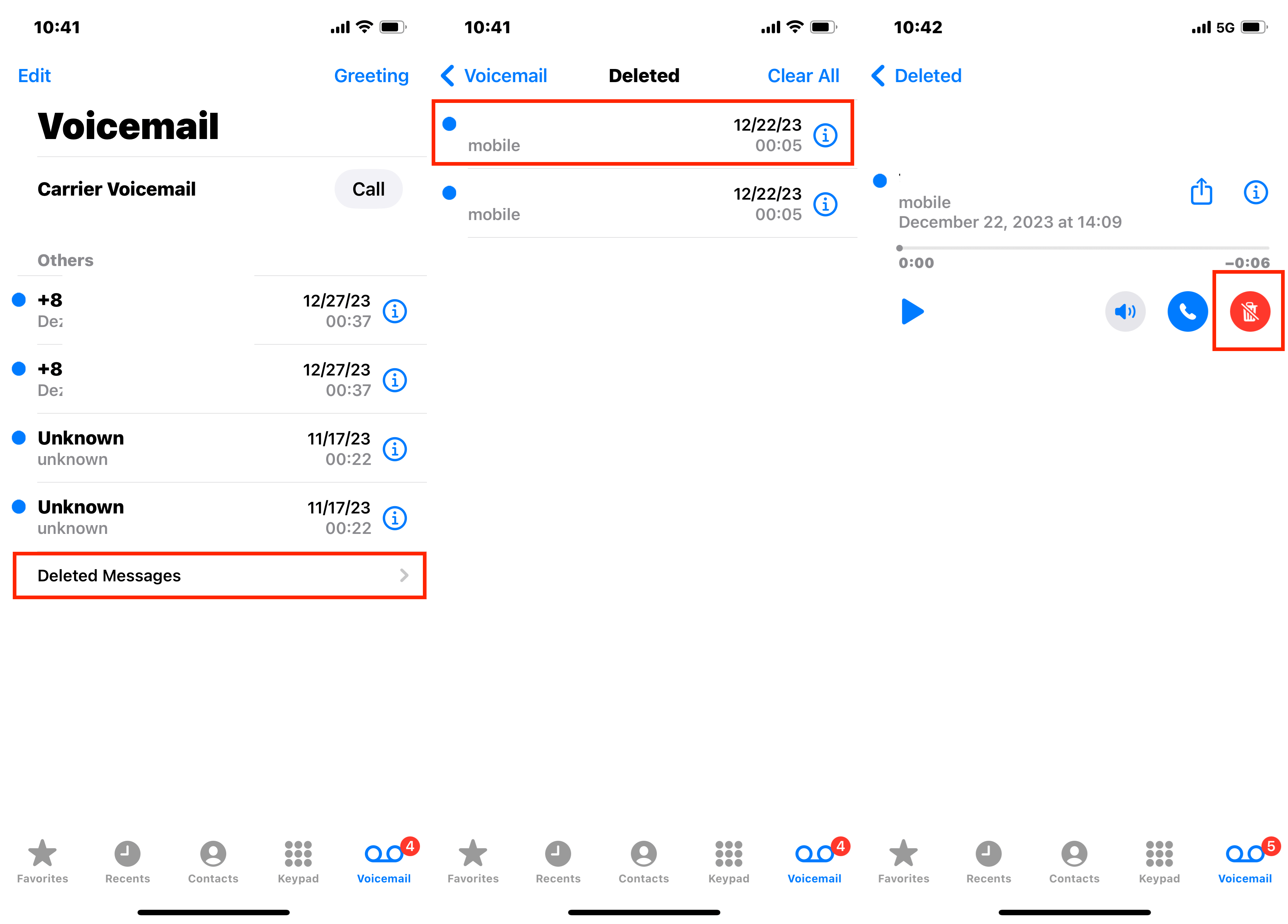
Cell phones, on the other hand, can be a bit trickier. Most have a 'Delete' or 'Erase' option in their voicemail menu. But here's a pro tip: Some phones let you delete messages directly from your call log. Just look for the little 'X' or 'Trash Can' icon.
 Ways to Fix iPhone Voicemail Not Working [2026 Guide]
Visual Voicemail: The New Kid on the Block
Now, visual voicemail is a whole different ball game. It's like having a mini social media feed for your voicemails. To delete messages, you usually just swipe left or right, or tap on a 'Delete' button. It's as simple as swiping through Tinder, but with less awkward silences (hopefully).
And here's another fun fact: Visual voicemail was first introduced by Apple in 2007. So, the next time you're deleting a message, you can thank Steve Jobs for making it so darn easy.
When in Doubt, Ask Siri
Feeling lazy? No worries, your trusty virtual assistant has got your back. Just say, "Hey Siri, delete my voicemails," and watch as your inbox becomes as pristine as a freshly cleaned house. Magic, right?
 iPhone Voicemail Full? Check 9 Quick Fixes Here
But Wait, There's More!
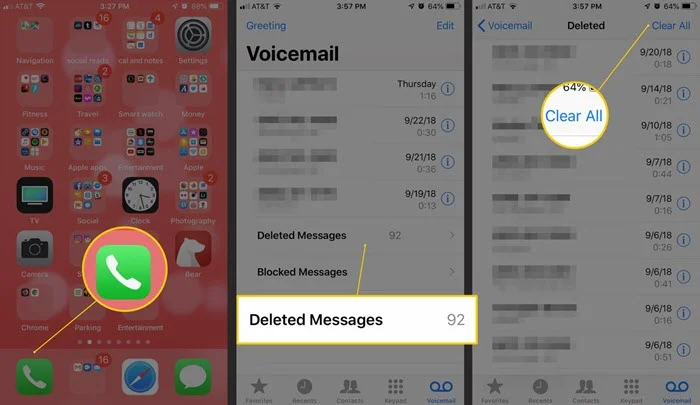
Now, you might be thinking, "What if I want to delete all my voicemails at once? Is that even possible?" The answer is yes, my friend, it is. Most voicemail systems have an 'Erase All' or 'Clear All' option. Just be careful, once you press that button, there's no going back.
And here's a little challenge for you: Try to delete all your voicemails in under a minute. It's like a game, but with less risk of losing your high score. Loser buys the next round, deal?
The Art of the Delete
Deleting voicemails might seem like a mundane task, but it's an art form nonetheless. It's about taking control of your digital life, one message at a time. So, go forth and delete, my friend. Your inbox will thank you.
And remember, every time you press that 'Delete' button, you're not just erasing a message, you're erasing a tiny bit of digital clutter from the world. You're a hero, in your own, slightly obsessive way.
