How Do I Get My Medicaid Number Online

Alright, folks, let's dive into the world of Medicaid like we're trying to find our way through a well-stocked fridge at midnight. You know, when you're so hungry, you'd even...

Alright, folks, let's dive into the world of Medicaid like we're trying to find our way through a well-stocked fridge at midnight. You know, when you're so hungry, you'd even consider eating the questionable leftovers from last week's taco night. But don't worry, getting your Medicaid number online is way less daunting than that.
First Things First: What's Medicaid, Anyway?
Imagine Medicaid as your health insurance superhero, swooping in to save the day when you need medical care, but your wallet's feeling a bit light. It's a government program that helps people who have a low income or certain disabilities pay for their medical expenses. Think of it as the safety net that catches you when you trip over your own two feet (we've all been there, right?).
So, You're Ready to Get Your Medicaid Number Online? Let's Do This!
First things first, you'll need to head over to the Health Insurance Marketplace website. It's like the grand central station of all things health insurance-related. Don't let the fancy name intimidate you; it's just a fancy way of saying 'online marketplace'.
Must Read
Now, before you dive in, make sure you've got all your ducks in a row. You'll need some personal information, like your Social Security number, your income, and your family size. It's like when you're trying to order a pizza online, and they ask for your address, phone number, and whether you want extra anchovies (who are we kidding, nobody wants those).
Step 1: Create an Account
Once you're on the website, you'll need to create an account. It's like making a new friend on social media, but with way less cat memes (although, who knows, maybe they'll throw in a few for good measure?).
Click on the 'Create an Account' button, and follow the prompts. It's as simple as ordering a venti, half-caf, no-foam, extra-shot, caramel macchiato at your favorite coffee shop. Okay, maybe not that simple, but you get the idea.
Step 2: Apply for Medicaid
Now that you've got your account all set up, it's time to apply for Medicaid. It's like when you're applying for a job, but instead of trying to impress your potential boss with your mad skills, you're just trying to impress the system with your mad personal information.
Click on the 'Apply for Health Insurance' button, and then select 'Apply for Medicaid'. It's like when you're at a buffet, and you're trying to decide between the pasta and the pizza. But in this case, you're not deciding between two delicious options; you're deciding between one very important option and... well, nothing. Because that's the only option here.
 Your Guide to the Insurance Card | Memorial Sloan Kettering Cancer Center
Step 3: Fill Out the Application
Alright, folks, this is where the rubber meets the road. You'll be filling out a bunch of forms, answering questions about your income, your family size, and your medical needs. It's like when you're filling out a survey to get a free sample of your favorite ice cream, but with way less ice cream and way more serious stuff.
Take your time, and make sure you answer all the questions as accurately as possible. It's like when you're trying to figure out how to put together that complicated piece of IKEA furniture. You don't want to rush it and end up with a wonky bookshelf (trust us, we've been there).
Once you've filled out the application, click 'Submit'. It's like when you're finally done with your taxes, and you click 'File'. You feel a sense of relief, accomplishment, and maybe just a tiny bit of pride. Okay, maybe not pride, but you get the idea.
What Happens Next?
After you've submitted your application, it'll be reviewed by the appropriate folks. It's like when you're waiting for your teacher to grade your essay, and you're crossing your fingers that you didn't make any silly mistakes.
If you're eligible for Medicaid, you'll get a letter in the mail with your Medicaid number. It's like when you're waiting for your birthday card from your grandma, and it finally arrives. You rip open the envelope, and there it is: your Medicaid number, staring back at you like a shiny new present.
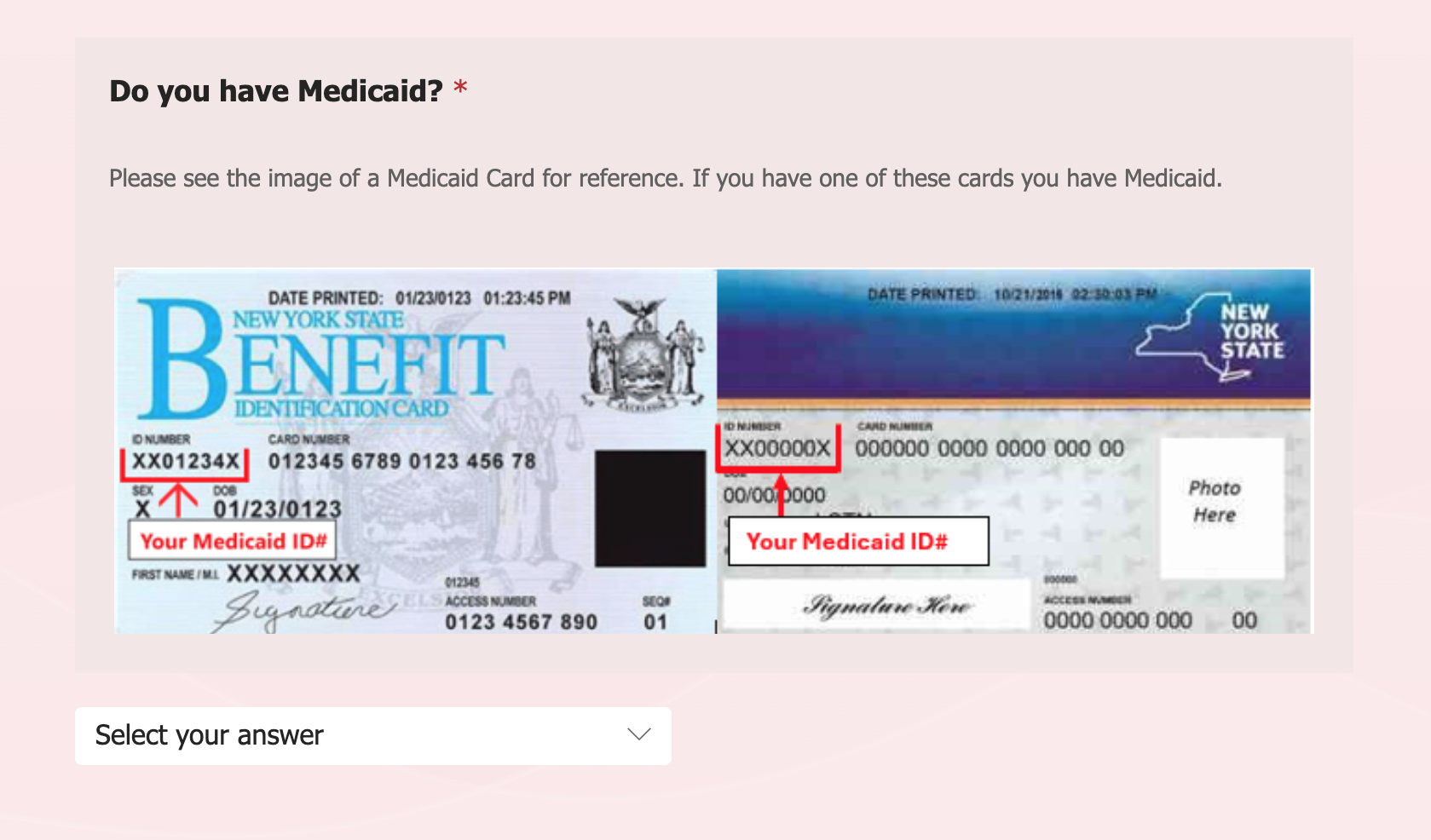 In a First, Screening Tool Leads Way to Medicaid Food Assistance - Food
Once you've got your number, you can use it to access your Medicaid benefits. It's like when you finally get that coupon you've been waiting for, and you can use it to buy that fancy new gadget you've had your eye on. But in this case, it's not a fancy gadget; it's access to medical care. Which, let's be honest, is way more important.
But What If I Need Help?
Don't worry, folks, you're not alone in this. If you have any questions or run into any trouble, there are people who can help. It's like when you're trying to figure out how to use your new smart TV, and you call the customer service line. They walk you through it, step by step, until you're a pro at changing the channels.
You can call the Health Insurance Marketplace call center at 1-800-318-2596 (TTY: 1-855-889-4325). They're open 24/7, which is like having a friend who's always there to help, no matter what time of day it is.
Or, if you prefer the personal touch, you can find a local helper in your area. It's like having a personal shopper, but instead of helping you find the perfect pair of shoes, they're helping you navigate the world of health insurance.
And That's a Wrap!
And there you have it, folks! Getting your Medicaid number online is as easy as ordering a pizza. Okay, maybe not that easy, but you get the idea. It's a straightforward process, and with a little bit of patience and a lot of accurate information, you'll be well on your way to accessing the medical care you need.
So, what are you waiting for? Get out there, and get your Medicaid number online. Your health is worth it, and so are you.
