How Do I Know What Windows I Am Running

Hey there, tech-curious friend! Ever found yourself wondering, "What's my Windows version?" Well, you're in luck! Today, we're going on a little adventure to find out. No need...

Hey there, tech-curious friend! Ever found yourself wondering, "What's my Windows version?" Well, you're in luck! Today, we're going on a little adventure to find out. No need to be a tech whiz, just grab your mouse and let's dive in.
Why Bother?
First things first, why should you care about your Windows version? Well, it's like knowing your car's make and model. It helps when you need to find the right software, troubleshoot issues, or just chat shop with your tech-savvy pals. Plus, it's fun to see how far you've come from Windows 1.0!
Meet Your Windows Version
Alright, let's get to know your Windows version. It's like meeting a new friend - you want to know their name, right? Here's how you can find out yours:
Must Read
Click on the Start button. You know, that little Windows logo in the bottom left corner.
Now, right-click on the Start button. Yes, you heard it right! We're going rogue today.
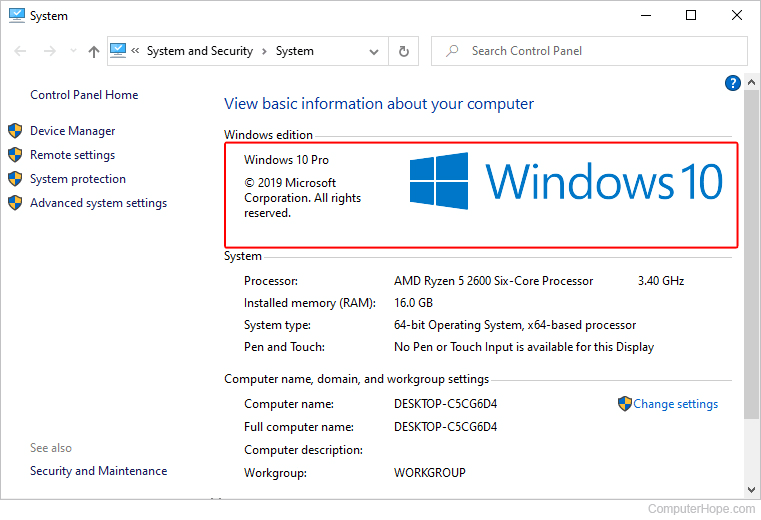 What Is My Windows Version
From the menu that pops up, click on System. It's like the control center of your PC.
Ta-da! The Big Reveal
In the System window, you'll see a heading that says Windows Specifications. Scroll down a bit, and there it is - your Windows version, clear as day! It might say something like Windows 10 Home or Windows 11 Pro. Isn't that exciting?
Fun Fact: The Naming Game
Did you know Windows versions have a naming scheme? It's like they're following a secret code. Here's a quick cheat sheet:
 How Do I Know What Windows Version I Am Running | Detroit Chinatown
Windows 1.x: The early days. Think floppy disks and green screens.
Windows 9x: The '90s were all about the 9x series. Windows 95 brought us the iconic Start button!
Windows NT: This is where things get serious. Windows NT is the foundation for most modern Windows versions.
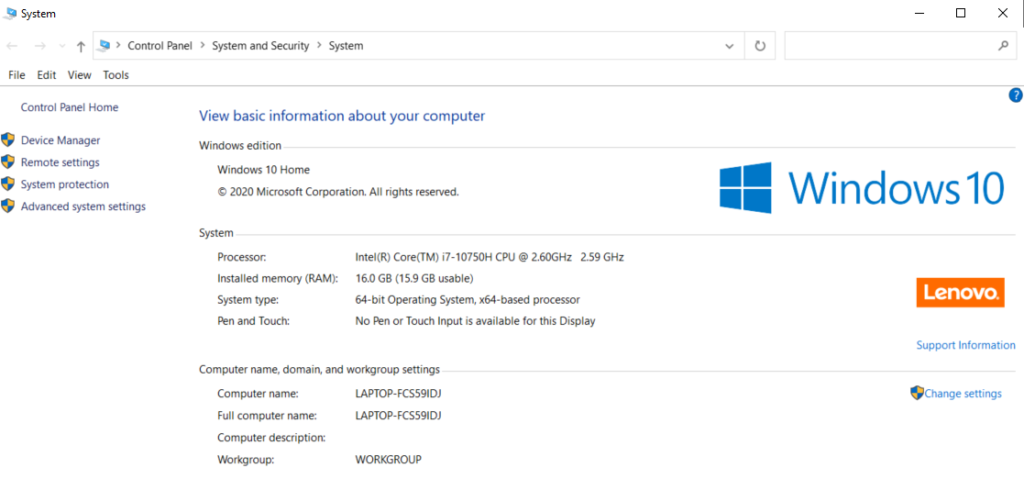 How Do I Know What Windows Version I Am Running | Detroit Chinatown
Windows 2000, XP, Vista, 7, 8, 10, 11: These are all part of the NT family. Each one brings new features and improvements.
Now What?
So, you've found your Windows version. Great job! Now you can impress your friends with your newfound knowledge. Or, you know, just brag about how far your PC has come. Either way, you're now part of the Windows family. Welcome aboard!
And remember, if you ever need to check again, just follow those simple steps. It's like finding an old friend - easy and fun!
