How To Add E Gift Card To Apple Wallet

Ever found yourself in a situation where you've got an eGift Card burning a hole in your digital pocket, but you're just not sure how to make the most of it? Well, let me tell...

Ever found yourself in a situation where you've got an eGift Card burning a hole in your digital pocket, but you're just not sure how to make the most of it? Well, let me tell you, friend, you're in the right place. Today, we're going to chat about how to add that bad boy to your Apple Wallet, and why it's like having your very own magical money pouch.
First Things First: What's Apple Wallet?
Alright, let's start with the basics. Apple Wallet is like your digital wallet on your iPhone or Apple Watch. It's where you can store your credit and debit cards, boarding passes, movie tickets, and yep, you guessed it - eGift Cards. It's like having a little digital assistant that keeps all your important stuff safe and sound, and makes your life a whole lot easier.
So, How Do I Add My eGift Card?
Adding an eGift Card to your Apple Wallet is as easy as pie. Seriously, it's like taking a stroll in the park on a sunny day. Here's how you do it:
Must Read
First, you'll want to open the Mail app on your iPhone. That's where your eGift Card should have landed after you bought it.
Once you've found your eGift Card, tap on it to open it up. It should look something like this: "Congratulations! You've got a $50 eGift Card for [Store Name]."
Now, here's where the magic happens. You'll see an Add to Apple Wallet button. Tap on that, and voila! Your eGift Card is now safely tucked away in your Apple Wallet.
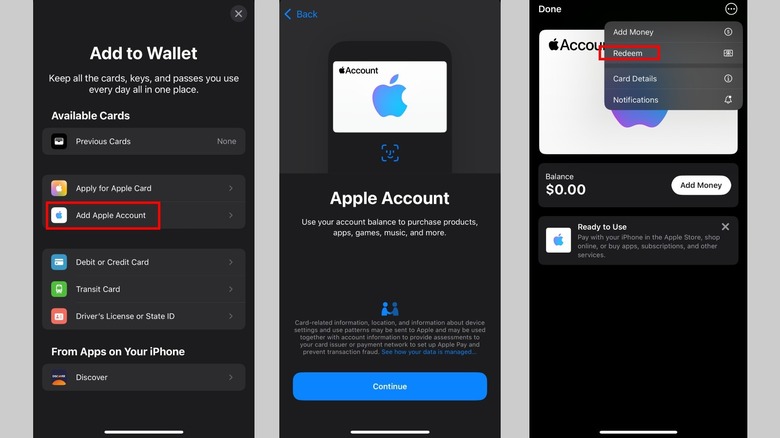 How To Redeem An Apple Gift Card Using Wallet On iPhone
And that's it! You're done. Wasn't that as easy as I promised?
But Wait, There's More!
Now that your eGift Card is in your Apple Wallet, you might be wondering, "What's in it for me?" Well, let me tell you, there's a whole lot of cool stuff happening here.
First off, having your eGift Card in your Apple Wallet means you can use it to pay for stuff super fast. Like, faster than you can say "eGift Card." When you're at the checkout, just hold your iPhone or Apple Watch near the reader, and boom - you're done. It's like having your own personal magic money wand.
 How to Add Apple Gift Cards to Wallet
Another neat thing about having your eGift Card in your Apple Wallet is that it's always with you. No more worrying about leaving your gift card at home, or having it expire because you forgot about it. It's right there in your wallet, ready to use whenever you need it.
And here's a little bonus tip for you: If you've got an Apple Watch, you can use your eGift Card to pay for things without even having your iPhone with you. How's that for convenient?
So, What Are You Waiting For?
Now that you know how easy it is to add your eGift Card to your Apple Wallet, it's time to get started. Go on, give it a try. You'll be amazed at how much easier your life becomes. And who knows, you might just find yourself using that eGift Card more than you thought you would. Happy spending!
