How To Make A Google Doc Questionnaire

Ever found yourself in a situation where you needed to gather some info, but the thought of sending a million emails or texts made you want to hide under your desk? Yeah, been...

Ever found yourself in a situation where you needed to gather some info, but the thought of sending a million emails or texts made you want to hide under your desk? Yeah, been there, done that. Well, my friend, let me introduce you to your new bestie - Google Docs Questionnaire. It's like having a little helper that takes the pain out of collecting data, one click at a time.
First Things First: Setting Up Your Doc
Alright, so you've got your Google Drive open, and you're staring at that blank screen, wondering where to start. Don't worry, it's not as intimidating as it looks. Just click on that plus sign, select 'Google Docs', and name your new baby something like 'Super Awesome Questionnaire'. You can always change it later, so don't stress too much about the name.
Now, here's where it gets fun. You can format your doc to look as fancy or as simple as you like. Want it to look like a professional survey? Go for it. Or maybe you're feeling playful and want it to look like a game show buzz-in board? Hey, no judgment here. Just remember, the goal is to make it easy for folks to understand what you're asking and how to respond.
Must Read
Creating Your Questions: The Magic of Forms
You've got your doc set up, and now it's time to add some questions. But wait, you don't want to spend hours typing out each one, right? That's where Google Forms comes in. It's like having a little sidekick that does all the heavy lifting for you.
See that little link at the top of your doc that says 'Use template'? Click on that, and select 'Blank Questionnaire'. Boom! You've just created a basic form with a title and a question. Now, you can add as many questions as you need, and choose from different types like multiple choice, dropdown, or even a good old-fashioned text response.
And get this, you can even make questions mandatory. No more half-filled-out forms driving you nuts. It's like having a little bouncer at the door, making sure only the complete responses get in.
 How to Make a Questionnaire in Google Docs - GeeksforGeeks
Pro Tip: Make It Shine with Images and Videos
Feeling creative? You can jazz up your form with images and videos. Want to ask about someone's favorite movie? Add a YouTube video link so they can watch the trailer right there. Or maybe you want to know what kind of cat they prefer. Add a cute kitty pic for some purr-fect inspiration.
To add media, just click on the little plus sign in the toolbar, select 'Image' or 'Video', and upload or paste the link. Easy peasy, lemon squeezy.
Sharing Is Caring: Getting Your Form Out There
You've crafted your masterpiece, and now it's time to share it with the world. Or at least, the people you want to fill it out. Click on the 'Share' button in the top right corner, and you'll see a little link appear. You can copy that link and send it out via email, text, or even post it on social media if that's your jam.
But wait, what if you want to keep it a little more private? You can change the sharing settings to require people to sign in with a Google account, or even limit it to just certain people. It's like having a secret clubhouse, but with way more paperwork.
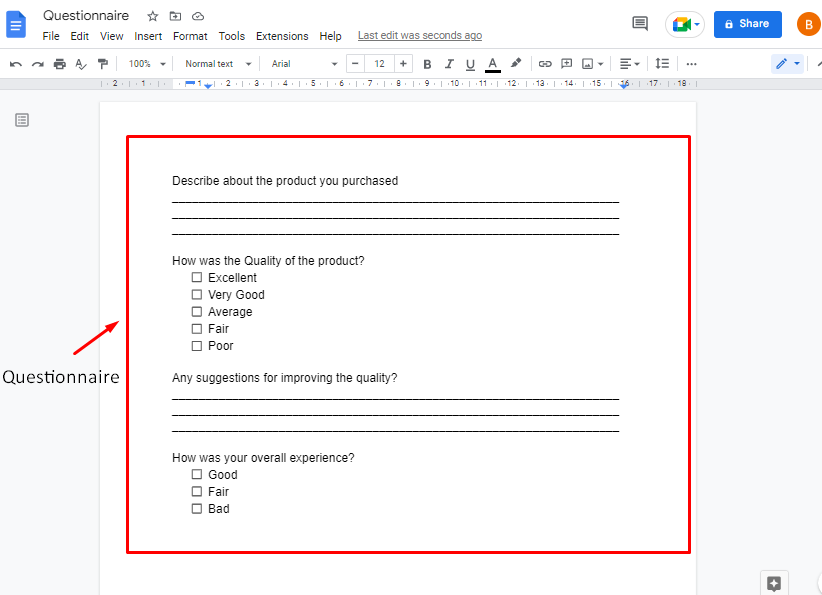 How To Make A Questionnaire With Google Docs The Norwegian Standard
Bonus Round: Collecting and Organizing Responses
Alright, so you've sent out your form, and now responses are rolling in. But how do you keep track of all that info? That's where the magic of 'Responses' comes in. Click on that tab at the top of your form, and suddenly, you're looking at a spreadsheet filled with all the answers.
You can sort, filter, and even export your data to a proper spreadsheet if you want to get all fancy with it. It's like having your very own data analyst, but without the fancy degree or the expensive coffee habit.
And the best part? You can see the responses coming in real-time. It's like having a little live feed of your form's popularity. Just don't get too addicted to refreshing the page, okay?
You Did It! Now Go Celebrate
And there you have it, folks. You've just created your very own Google Docs Questionnaire. You're now a master of data collection, a champion of information gathering, a... well, you get the idea. So go forth, create, and collect with pride. And remember, if you ever get stuck, Google's there to help. Just don't tell them I said they were your new bestie.
