How To Set Up Email Account On Gmail

Alright, folks, let's dive into the world of Gmail and set up an email account that'll make you feel like you're running the show, even if you're just replying to your mom's f...

Alright, folks, let's dive into the world of Gmail and set up an email account that'll make you feel like you're running the show, even if you're just replying to your mom's forwarded chain emails. 😉
First Things First: The Basics
Before we get started, make sure you've got a Google account. If you're using any Google services like YouTube, Google Drive, or even searching on Google, chances are you already have one. If not, head over to Google's sign-up page and let's get that sorted.
Now, let's talk about why Gmail is like the cool kid at the email party. It's got a whopping 1.8 billion users worldwide, it's free (yes, you heard it right), and it's got more features than a Swiss Army knife. Plus, it's as reliable as your favorite pair of jeans. 👖
Must Read
Setting Up Your Gmail Account
Once you're logged into your Google account, it's time to set up your Gmail. Click on the 'Gmail' icon in the top-right corner of your screen, and you'll be redirected to the Gmail sign-up page. Here's where you'll choose your email address. Be creative, but not too creative - you want people to be able to spell it, after all. 🤔
Next up, you'll choose a password. Make it strong, like your morning coffee. A mix of uppercase and lowercase letters, numbers, and symbols is a good start. And remember, never share your password with anyone. Not even your best friend. Or your dog. 🐶
Once you've set your password, it's time to fill in your personal details. Don't worry, this is all secure. And if you're feeling paranoid, remember that Google knows more about you than your own mother. 😂
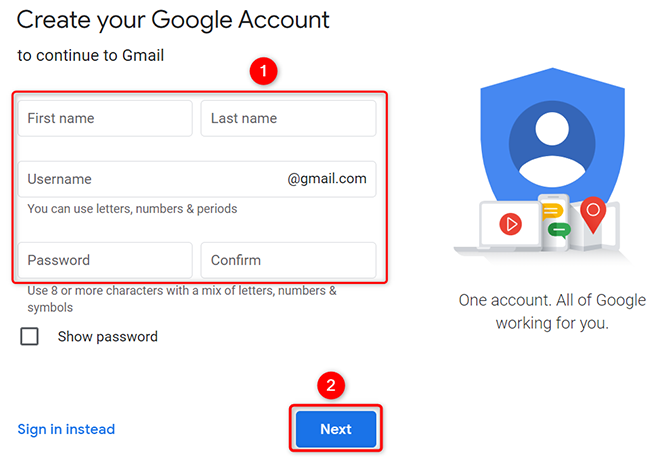 How to Create a Gmail Account
Customizing Your Gmail Experience
Now that you're in, it's time to make Gmail your own. Click on the gear icon in the top-right corner, then 'See all settings'. Here, you can customize your theme, inbox type, and even set up vacation responses. Because let's face it, we all need a break sometimes. 🏝️
Another cool feature is the 'Undo Send' option. We've all been there - you hit send, then realize you've forgotten to attach that important document. With 'Undo Send', you can recall that email before it reaches the recipient. Phew! 😅
Connecting Your Devices
Gmail isn't just for your laptop anymore. You can access it on your phone, tablet, even your smartwatch. To connect your devices, head back to the settings, then 'Accounts and Import', and 'Change password recovery options'. Here, you can add your phone number for two-step verification. It's like having a secret handshake with Google. 🤘
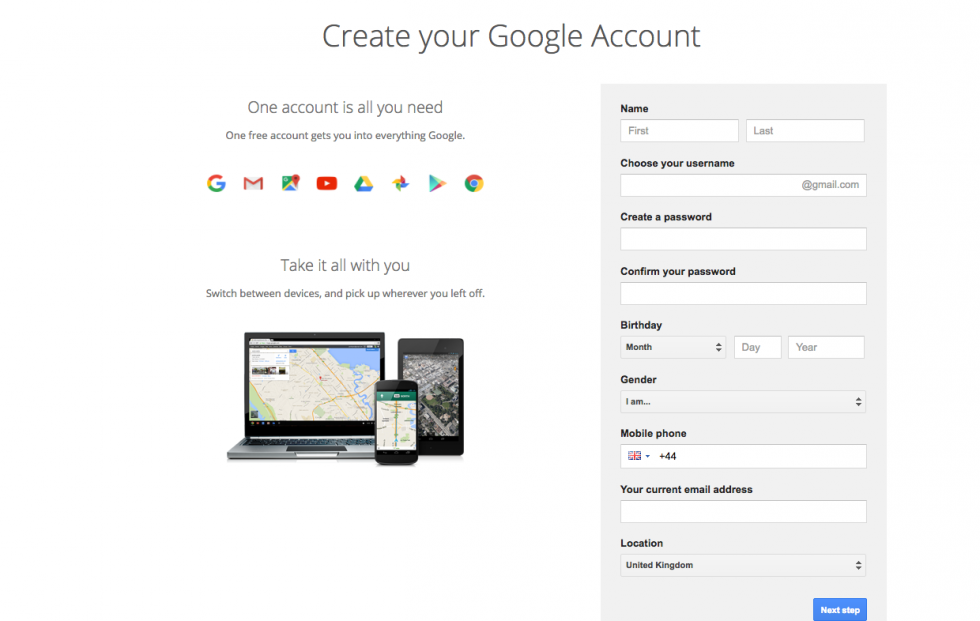 How to create a Gmail account | Digital Unite
To add your device, just open the Gmail app, tap 'Add account', and follow the prompts. It's as easy as ordering a pizza. 🍕
And You're Off!
Congratulations, you're now a fully-fledged Gmail user! You can send emails, receive emails, and even reply all (but please, don't). 🤣
Remember, Gmail is like a muscle. The more you use it, the stronger it gets. So, don't be afraid to explore all its features. And who knows, you might even start enjoying email. 💌
But hey, don't forget to look up from your screen every once in a while. Life's happening out there too. 🌍
