Reset Boost Mobile Voicemail Password

So, there I was, minding my own business, when I realized I'd forgotten my voicemail password. I mean, who can keep track of all these passwords, right? It's like trying to re...

So, there I was, minding my own business, when I realized I'd forgotten my voicemail password. I mean, who can keep track of all these passwords, right? It's like trying to remember a different secret handshake for every friend you have. Anyway, I was stuck in a loop, typing in random numbers, hoping for a miracle. That's when it hit me - I needed a reset. But how?
Boost Mobile to the Rescue
I'm a Boost Mobile fan, so I thought, "Let's see what they've got." I mean, they've always been pretty helpful with their plans and such. But could they help me with my voicemail woes? Let's find out.
First Things First: Log In
Alright, so the first step is to log in to your Boost Mobile account. Now, I know what you're thinking, "But I can't log in because I've forgotten my password!" Well, don't worry, we'll get to that. For now, let's assume you can log in. If you can't, skip to the next section.
Must Read
Once you're in, look for the "My Account" tab. Click on that, and then look for "Manage My Features". See it? Good. Click on that too. Now, you should see an option that says "Voicemail". Click on that, and voila! You're in your voicemail settings.
Now, look for the "Change Password" option. Click on that, and you should be able to reset your password. Easy peasy, right? If you're still having trouble, give their customer service a call. They're usually pretty helpful.
 How To Reset Voicemail Password Even If You Forgot It - YouTube
What If I Can't Log In?
Alright, so you've tried logging in, but no luck. Don't worry, all is not lost. You can still reset your password. Here's how:
First, go to the Boost Mobile website and look for the "Forgot Password?" link. It's usually at the bottom of the login page. Click on that. Now, you'll need to enter your phone number. Make sure you enter it correctly, or you'll be stuck in another loop.
Once you've entered your number, click "Submit". Boost Mobile will send you a text message with a temporary password. Check your messages, and you should find it there. Use that temporary password to log in to your account.
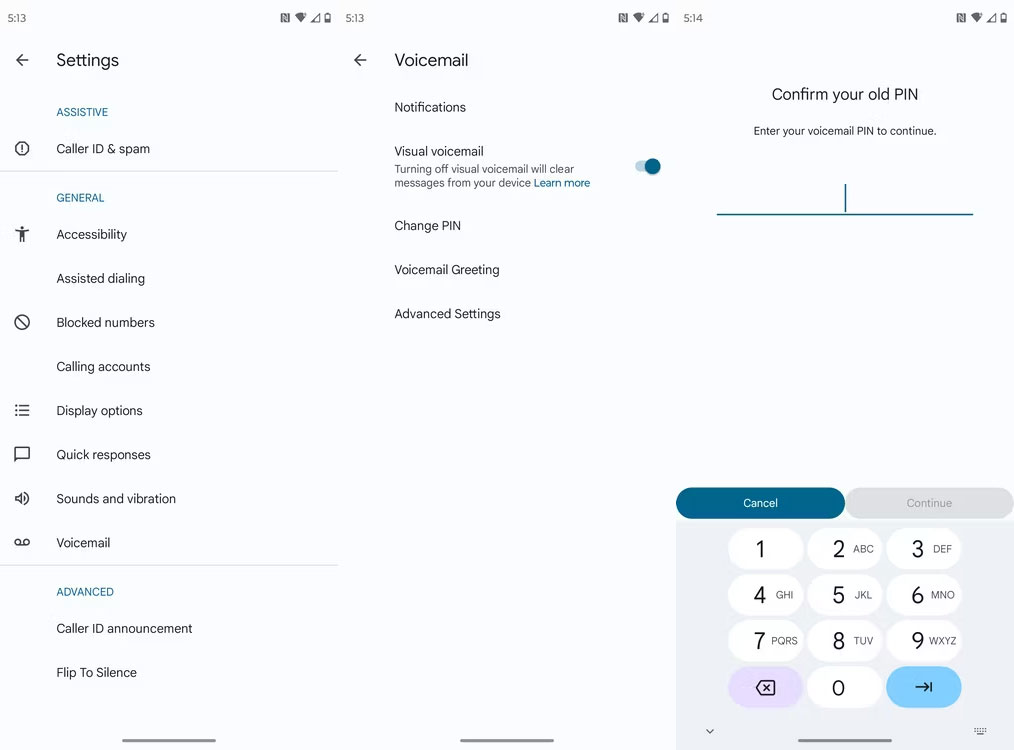 How to reset Voicemail password on Android or iPhone
Now, follow the same steps I mentioned earlier to change your password. Make sure to choose something you'll actually remember this time. I mean, we don't want to be doing this again, do we?
Some Tips to Remember
Alright, so you've reset your password. Great job! But how do you make sure you don't forget it again? Here are a few tips:
- Write it Down: I know, I know, it's not the most secure method, but it works. Just make sure you keep it in a safe place.
- Use a Password Manager: If you're tech-savvy, consider using a password manager. It can generate strong passwords and store them securely.
- Make it Something You'll Remember: This might seem obvious, but it's important. Choose a password that you can associate with something. Like your pet's name, or your favorite movie. Just make sure it's not too obvious.
And there you have it, folks. You've successfully reset your Boost Mobile voicemail password. I hope this helped. If you have any other questions, feel free to ask. I'm always here to help. Until next time!
