How Do I Delete My Voicemail Messages

Alright, let's dive into the voicemail abyss. You know, that digital graveyard where forgotten messages from your mom, that one friend who loves to chat, and even that mysteri...

Alright, let's dive into the voicemail abyss. You know, that digital graveyard where forgotten messages from your mom, that one friend who loves to chat, and even that mysterious telemarketer reside. It's time to clean house, and it's easier than you think!
Why Bother?
First things first, why should you care about deleting voicemails? Well, for starters, it's like decluttering your mental space. Every time you listen to a message, your brain processes it, even if it's just to say, "Oh, it's just another 'Hey, call me back' from Susan."
Plus, let's not forget about storage space. Every message takes up a tiny bit of your phone's memory. Delete enough of them, and you might just free up enough space for that new game you've been eyeing.
Must Read
Know Your Enemy
Before we start, let's get to know the voicemail a little better. Did you know that the average length of a voicemail is about 33 seconds? That's roughly the time it takes to boil an egg. Or, if you're feeling fancy, to pour a perfect shot of espresso.
And here's a fun fact: The longest voicemail ever recorded was over 65 hours long. Yes, you read that right. Some poor soul listened to a 65-hour message. We're not sure why, but we're guessing it involved a very long story and a very patient person.
Let's Get Deleting!
Now that we've had our fun, let's get down to business. The exact steps to delete voicemails vary depending on your phone model, but here are some general guidelines:
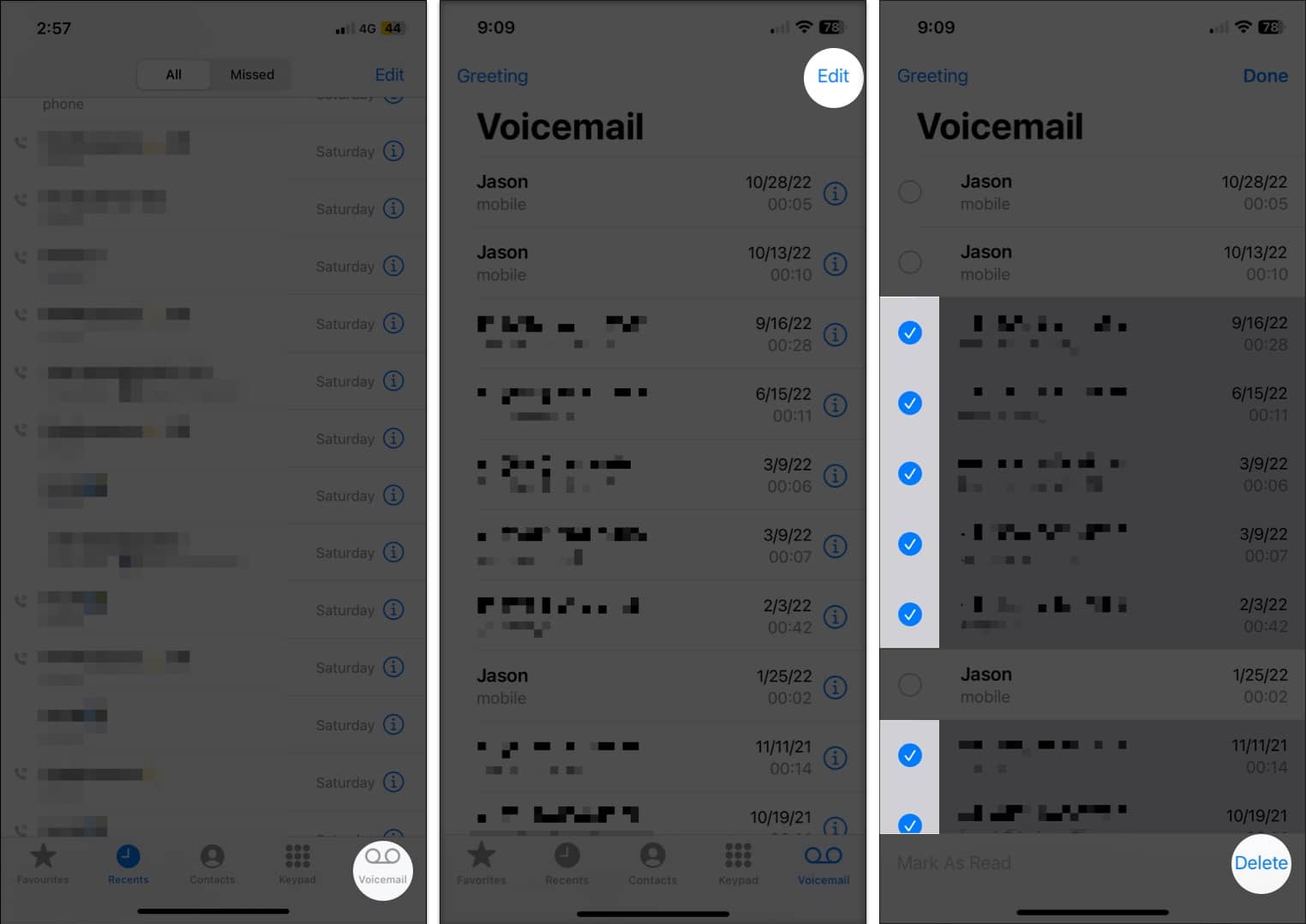 How to Delete Voicemails on iPhone (and Recover Them Easily) - iGeeksBlog
For iPhones
1. Open the Phone app and tap on 'Voicemail'.
2. You'll see a list of messages. Swipe left on the message you want to delete.
3. Tap on the red 'Delete' button that appears. Easy peasy!
For Androids
1. Open the Phone app and tap on the three vertical dots (the menu button) at the top right corner.
 How to Delete Voicemail on iPhone
2. Select 'Call History' or 'Voicemail', depending on your phone model.
3. Tap on the message you want to delete, then tap on the trash can icon. Done!
Bonus Round: Automate the Process
If you're feeling really tech-savvy, you can even automate the deletion process. Some phones have settings that allow you to automatically delete voicemails after a certain period. Check your phone's settings to see if this is an option.
And there you have it! You're now a voicemail-deleting pro. Go forth and conquer that inbox. Just remember, next time you're about to leave a message, keep it short and sweet. Your friends (and their phones) will thank you.
