How To Get Rid Of Voicemail Password

So, you've found yourself in the digital equivalent of a dungeon, haven't you? That dreaded voicemail password, stronger than a dragon's hoard, and just as unyielding. I feel...
So, you've found yourself in the digital equivalent of a dungeon, haven't you? That dreaded voicemail password, stronger than a dragon's hoard, and just as unyielding. I feel you, friend. We've all been there, staring at that keypad, willing it to just... work. But fear not! We're gonna tackle this together, like a couple of tech-savvy heroes on a quest.
First Things First: Check Your Phone's Settings
Before we dive into the deep end, let's make sure your phone isn't playing a sneaky trick on you. Some phones have a setting that requires a password for voicemail access. It's like a secret door, hidden in plain sight. So, give your settings a once-over, would ya?
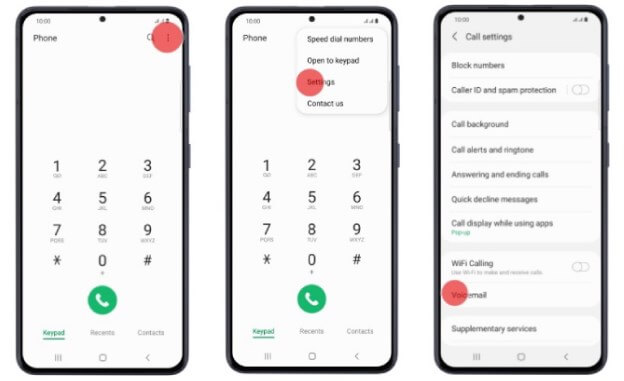
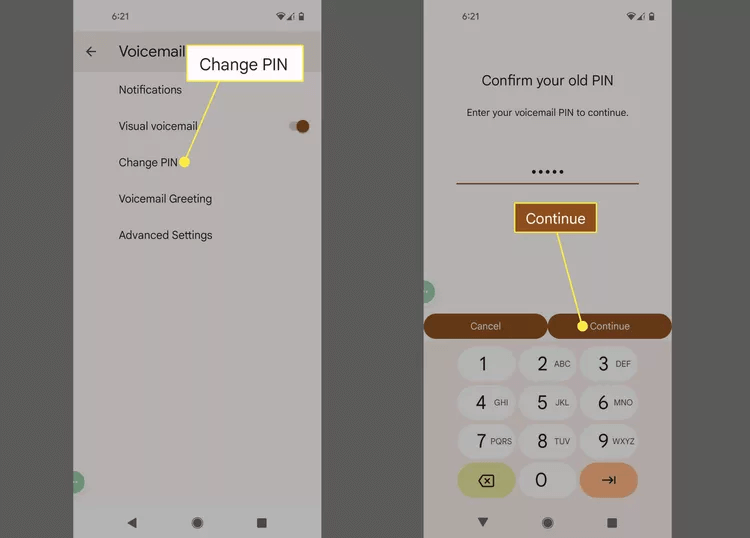
If you're on an iPhone, head to Settings, then Phone, and look for Change Voicemail Password. On Android, it's a bit of a treasure hunt. Start at Settings, then Call Settings, and keep digging until you find Voicemail Settings or something similar.
Must Read
When in Doubt, Call Your Carrier
Alright, so you've checked your phone's settings, and nada. Now it's time to bring in the big guns - your carrier's customer service. I know, I know, the mere mention of 'customer service' can make your ears bleed, but hear me out.
They've got the keys to the kingdom, so to speak. They can reset your voicemail password like it's nobody's business. The catch? You might have to jump through a few hoops, like answering security questions or providing some ID. But hey, no pain, no gain, right?
Before You Call: Gather Your Info
To make this whole process as smooth as possible, grab your account number, the phone number in question, and some form of ID. If you're not the account holder, you might need their info too. It's like gathering your gear before a quest - preparation is key!
 Reset/Recover Voicemail Password on Android When Forgot It!
What If You've Forgotten Your Password?
Alright, so you've checked your phone's settings, called your carrier, and now you're staring down the barrel of a password reset. But what if you've forgotten what your current password is? Don't worry, we're not out of the woods yet, but we're not lost either.
Some carriers let you reset your voicemail password using your phone's keypad. It's like a secret code, straight out of a spy movie. Here's how you do it:
- Dial your voicemail number (usually something like *86).
- When prompted, enter your password. If you're lucky, it'll work. If not, don't worry, we're not there yet.
- If you're greeted with a friendly 'password incorrect' message, don't hang up just yet. Some carriers let you reset your password by following a series of prompts. If that's the case, you'll be guided through the process like a pro.
If all else fails, and you're still staring down that dreaded 'password incorrect' message, it's time to call in the cavalry. Your carrier's customer service can help you reset your password, even if you've forgotten what it is. Just remember, they might need to verify your identity first. It's like a trial of bravery, but with less dragons and more security questions.
 How To Fix Voicemail Box Full But No Messages? [Android]
Preventing Future Password Panic
Alright, so you've finally conquered the beast, and your voicemail is once again under your control. But wait! There's more. Let's talk about prevention, because nobody wants to find themselves in this pickle again.
First things first, write down your new password. I know, I know, it's like going back in time to the dark ages, but hear me out. Find a safe spot - not on a post-it note on your monitor, that's just asking for trouble - and jot it down. You could even encrypt it, if you're feeling fancy.
Next up, consider setting up two-factor authentication. It's like having a guard dog for your voicemail. Sure, it might be a bit of a hassle to set up, but it's worth it in the long run. Your voicemail will be safer than Fort Knox, and you'll sleep easier at night.
And there you have it, folks. We've tackled the dreaded voicemail password, and lived to tell the tale. Next time you find yourself staring down that password prompt, you'll be ready. You're a tech hero now, and the world of voicemail is your oyster. Now go forth, and conquer those messages!
