What Is The Divide Function In Excel

Unveiling the Magic of Excel's Divide Function Ever found yourself in a situation where you needed to divide a list of numbers, but the thought of doing it manually made you...
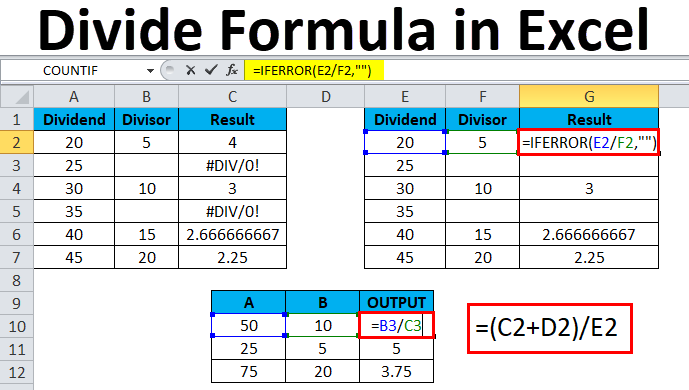
Unveiling the Magic of Excel's Divide Function
Ever found yourself in a situation where you needed to divide a list of numbers, but the thought of doing it manually made you reach for the nearest snack instead? Well, fear not, dear spreadsheet enthusiast! Excel has a nifty little function just for you - the DIVIDE function.
Before we dive in, let's set the scene. Imagine you're a modern-day da Vinci, sketching out a budget for your upcoming dream vacation. You've got a list of expenses - flights, accommodation, gelato (because priorities, right?). Now, you need to find out how much each expense is as a percentage of your total budget. That's where our friend, the DIVIDE function, comes in.
Meet the DIVIDE Function
The DIVIDE function, in its simplest form, is like the math teacher you always wanted - patient, consistent, and always ready to help. Its syntax is as follows:
Must Read
DIVIDE(number, divisor)
Here, number is the value you want to divide, and divisor is the value you're dividing by. Easy peasy, right?
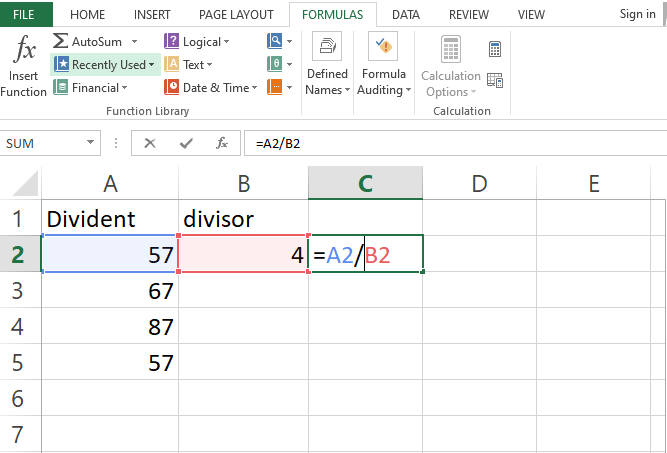 How to use the Division Formula in Excel?
Let's Get Practical
Let's say you've got a list of expenses in cells A2:A6, and your total budget in cell A1. You want to know what percentage each expense is of the total. Here's how you'd do it:
1. In cell B2, type =DIVIDE(A2, A1).
2. Press Enter. Excel will now show you the percentage of your total budget that the first expense represents.
 Division formula in Excel for multiple cells - ExcelDemy
3. To apply this formula to the rest of your expenses, simply drag the fill handle (the small square in the bottom-right corner of the cell) down to copy the formula for the rest of the list.
Fun Fact: DIVIDE and the Stock Market
Did you know that the DIVIDE function is a staple in the world of finance? It's used daily by stockbrokers to calculate the price-to-earnings ratio, which helps them decide whether a stock is overvalued or undervalued. Now, that's what you call a powerful function!
Reflection: The Art of Simplification
In a world filled with complex tasks and endless to-do lists, it's the small, simple things that often make the biggest difference. The DIVIDE function is a prime example of this. It takes a task that could be daunting - dividing a list of numbers - and makes it as easy as typing a few characters. So, the next time you're faced with a mountain of work, remember: sometimes, all you need is a simple function to make the climb a little easier.
