How To Attach A Gif To A Text Message

Picture this: You’re mid-conversation with your best friend, and suddenly, you remember that one time they tripped over their own shoelaces like a penguin on ice. The words "I...

Picture this: You’re mid-conversation with your best friend, and suddenly, you remember that one time they tripped over their own shoelaces like a penguin on ice. The words "I need to show you this" pop into your head, but typing out the whole story would take forever. That’s where GIFs swoop in like a digital superhero, saving the day with a single, perfect loop of chaos.
Attaching a GIF to a text message is like handing someone a tiny, animated postcard—except this postcard never gets lost in the mail, and it’s way more entertaining. Whether you’re trying to explain why your cat’s antics are definitely sabotage or just need to vent about your coworker’s questionable dance moves, a GIF can say it all in under three seconds. No need for a novel; just pure, unfiltered emotion in pixel form.
Step 1: Find Your GIF Goldmine
First things first: where do you even dig up these little animated treasures? If you’re not already addicted to GIFs, now’s the time to start scrolling through GIPHY or TikTok like it’s your job. Think of it as treasure hunting, but instead of gold, you’re hunting for the perfect "oh my god, that’s me" moment.
Must Read
Pro tip: Use keywords like "fail," "react," or "dramatic," and you’ll find a GIF for every situation—like that time you tried to parallel park and ended up looking like a drunk astronaut. We’ve all been there.
Bonus Round: Save Your Favorites
If you’re the type who lives by the "I’ll need this later" rule (hello, meme hoarder), bookmark your favorite GIFs or save them to a folder. Trust me, you’ll thank yourself when your friend texts you at 2 AM asking, "How do I even explain this situation?" and you’re like, "I’ve got the GIF for this."
Step 2: Attach Like a Pro
Now that you’ve found your GIF masterpiece, it’s time to slap it onto that text message like it’s a sticker on a notebook. On most phones, you’ll see an option to "Add Media" or "Attach" when you’re typing a message. Tap it, and voila—your GIF is now part of the conversation.
If your phone is being extra, you might need to copy the GIF URL from the website and paste it into the message. It’s like sending a digital Polaroid, but with way less risk of it getting lost in the backseat of your car.
Quick Fix: If It Doesn’t Work
Sometimes, GIFs act like that one friend who shows up late to everything. If your message isn’t sending, double-check that your internet is on and that the GIF isn’t too large (some apps have size limits). If all else fails, just send a quick voice note and say, "I tried to send you a GIF, but it was too dramatic even for me." They’ll get it.
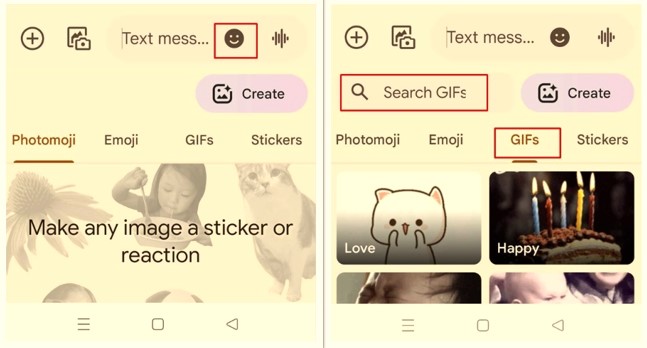 How to Add & Send GIFs in Text Messages [Any Device]
Step 3: Make It Personal
Here’s where things get fun: pairing your GIF with the right words. Need to explain why your roommate’s cooking skills are questionable? A GIF of a sad clown with the caption "This is my life" does the job. Want to celebrate your friend’s promotion? A GIF of them jumping for joy (or at least pretending to) with "Congrats, you’re officially a boss" makes it official.
Think of your text as a tiny, digital storybook. The GIF is the illustration, and your words are the caption. Together, they’re basically a masterpiece of modern communication.
When in Doubt, Just Send the GIF
Let’s be real—sometimes you don’t even need words. That GIF of the dog looking at a microwave like it’s a science experiment? Sent to your friend who just burned their toast? Game over. No explanation needed.
GIFs are the ultimate shortcut for when words fail you. They’re like that one friend who always knows exactly what you’re feeling, even if you can’t put it into words. And honestly? That’s kind of the magic of them.
Step 4: Master the Art of Timing
Timing is everything, especially with GIFs. If you send one too early, your friend might think you’re being sarcastic. If you send it too late, they might forget why they needed it in the first place. The sweet spot? Right when they’re about to ask, "How do I even explain this?"—but you’ve already got the answer.
 Effective Ways to Insert and Share GIFs in Text Messages Across Any
Consider it the digital equivalent of showing up at a party with the perfect playlist. It’s not just helpful; it’s chef’s kiss.
Pro Move: Use GIFs to Break the Ice
Stuck in a conversation that’s going nowhere? A well-timed GIF can be the spark that gets things rolling. Need to lighten the mood after a bad day? A GIF of a cat falling off a table with "This is my life" can turn a frown upside down. It’s like having a tiny, animated icebreaker in your pocket.
And if all else fails? Just send a GIF of a confused baby. It’s universally relatable, and suddenly, everyone’s laughing.
Final Thought: GIFs Are the New Emojis
Emojis are great, but they’re like trying to describe a sunset with a single word. GIFs? They’re the full painting. They capture emotion, humor, and even that weird little moment where you’re just vibing with life (or your cat’s antics).
So next time you’re about to type out a novel of a text, pause. Think. Then hit that GIF button. Your phone will thank you, your friends will thank you, and you’ll finally understand why everyone’s so obsessed with these little animated loops.
Now go forth and GIF like a pro. The world needs more joy, and you’ve got the perfect tool to deliver it.
